












When we think about CSS-Styled lists, different ideas come to mind but that rusty old image of bulleted items is not one of them anymore. There are lots of different methods to format nice HTML lists that is used in most web designs not only for navigation menu (vertical or horizontal) but for formatting many design blocks in a stylish and elegant manner. In this article, we’ll have a look at how such lists can create a whole new look, feel, and effect of a site.
Different Uses of Styled Lists
1-Custom Select Box

<dl class="dropdown">
<dt id="two-ddheader" onmouseover="ddMenu('two',1)" onmouseout="ddMenu('two',-1)" class="module">Recent Archives</dt>
<dd id="two-ddcontent" onmouseover="cancelHide('two')" onmouseout="ddMenu('two',-1)">
<ul>
<li><a href='http://www.darrenhoyt.com/2008/06/' title='June 2008'>June 2008</a></li>
<li><a href='http://www.darrenhoyt.com/2008/05/' title='May 2008'>May 2008</a></li>
<li><a href='http://www.darrenhoyt.com/2008/04/' title='April 2008'>April 2008</a></li>
</ul>
</dd>
</dl>
2-Code Blocks
<div id="portfolio">
<ul id="gallery">
<li><img src="https://www.noupe.com/{client}/before.jpg" /></li>
<li><img src="https://www.noupe.com/{client}/sketch.jpg" /></li>
<li><img src="https://www.noupe.com/{client}/wireframe.jpg" /></li>
<li><img src="https://www.noupe.com/{client}/after.jpg" /></li>
</ul>
<img id="frame" width="580" height="415" src="https://www.noupe.comframe.png" />
<ul id="sequence">
<li id="before"><a href="https://www.noupe.com/{client}/before.jpg"><a></li>
<li id="sketch"><a href="https://www.noupe.com/{client}/sketch.jpg"><a></li>
<li id="wireframe"><a href="https://www.noupe.com/{client}/wireframe.jpg"><a></li>
<li id="after"><a href="https://www.noupe.com/{client}/after.jpg"><a></li>
</ul>
<a id="launch" rel="external" href="{url}">
<img src="https://www.noupe.comlaunch.png" alt="Launch this site" />
</a>
</div>
3-Tabs
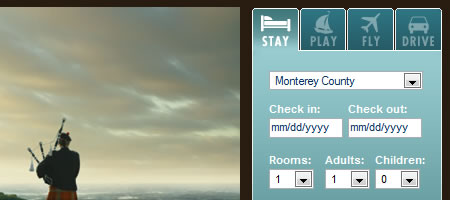
<ul id="home_button">
<li><a href="javascript:void(0)" onMouseOver="showContent('home_welcome_content','home_button_welcome')" id="home_button_welcome" class="on">Welcome</a></li>
<!-- <li><a href="javascript:void(0)" onMouseOver="showContent('home_mymonterey_content','home_button_mymonterey')" id="home_button_mymonterey">My Monterey</a></li> -->
<li><a href="javascript:void(0)" onMouseOver="showContent('home_visitors_content','home_button_visitors')" id="home_button_visitors">Visitor's Guide</a></li>
<li><a href="javascript:void(0)" onMouseOver="showContent('home_multimedia_content','home_button_multimedia')" id="home_button_multimedia">Multimedia Gallery</a></li>
<!-- <li><a href="javascript:void(0)" onMouseOver="showContent('home_travelblog_content','home_button_travel')" id="home_button_travel">Travel Blog</a></li> -->
<li><a href="javascript:void(0)" onMouseOver="showContent('home_weather_content','home_button_weather')" id="home_button_weather">Weather</a></li>
<li><a href="javascript:void(0)" onMouseOver="showContent('home_surf_content','home_button_surf')" id="home_button_surf">Surf Report</a></li>
</ul>
4-Post’s Information
<ul>
<li class="dateposted">Posted on: 19th November 2006</li>
<li>Posted by: <a href="http://ifelse.co.uk">Phu</a></li>
<li>Number of comments: <a href="http://ifelse.co.uk/archives/2006/11/19/cssedit-2-review/#comments">29</a></li>
<li><a href="http://ifelse.co.uk/archives/2006/11/19/cssedit-2-review/#commentform">Add a comment</a></li>
</ul>
5-Popular Posts Block
6-Blog’s Comment
7-CSS Galleries
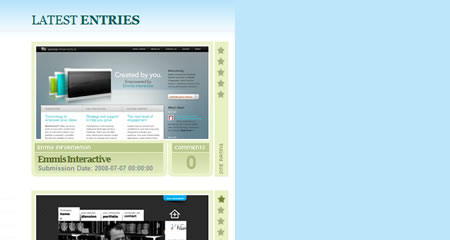
8-Text Blocks
Tutorials and Examples
1-Nested lists used to create a simple folder metaphore
A rough and ready example showing how to make a folder analogy using a nested list.

2-Mini Slide Navigation
3-html vs css pt2/navigation lists
This article will take a closer look at navigation lists and how an extra span + optional extra class can make our css work easier.
/* html code */ <li><a class="item"> nav item </a></li> <li class="active"><span class="item"> nav item </span></li> /* css code */ li .item {display:block; padding:0.5em;} /* css code alternative */ li a, li span {display:block; padding:0.5em;}
4-Floating next and back buttons using lists
For this exercise, you want to float a “back” button to the left and a “next” button to the right. You could use two divs, but to make it simpler you will use two list items.
/* html code */ <li><a class="item"> nav item </a></li> <li class="active"><span class="item"> nav item </span></li> /* css code */ li .item {display:block; padding:0.5em;} /* css code alternative */ li a, li span {display:block; padding:0.5em;}
5-Safe Lists Next to Left-Floated Elements
There are lots of different methods to format nice HTML lists. But are those methods reliable in all contexts and in all browsers? In this article, we’ll have a look at a simple context: a list with some left-floated element next to it.
6-Style Your Ordered List
Here is a quick CSS tutorial on how you can use the ordered list (ol) and paragraph (p) element to design a stylish numbered list.
7-Centering List Items Horizontally
Slightly Trickier Than You Might Think
8-Advanced CSS Menu Trick
Instead of simply altering the state of the navigation item the user is currently rolling over, we want to alter the non navigation items as well. This will help focus the users attention on the item they have selected on, and create a new look and feel for the site overall.
9-A Stripe of List Style Inspiration
Instead of simply altering the state of the navigation item the user is currently rolling over, we want to alter the non navigation items as well. This will help focus the users attention on the item they have selected on, and create a new look and feel for the site overall.
Further Reading on CSS-Styled Lists
Photo by Negative Space on Pexels













Send Comment:
29 Comments:
More than a year ago
Thank you! Really Helpful.
More than a year ago
Pretty nice post. I just stumbled upon your weblog and wanted to say that I've truly enjoyed surfing around your blog posts. After all I will be subscribing to your feed and I hope you write again soon!
More than a year ago
some of them are really nice, I am looking for a listing style of product list with pictures, any one can give me a direction?
More than a year ago
Hello,
here is boxy tabs on tahsin's garage
More than a year ago
Nice lists and tutorials. Heres another one i've recently made
More than a year ago
Cheers Noupe! ... great tips as always boys !
More than a year ago
Great resources thanks a lot
More than a year ago
Great Post, I've been looking for some good tutorials on list styling.
More than a year ago
Great collection thanks :)
More than a year ago
Great collection! Thanks :)
More than a year ago
wrong, wrong, wrong. Learn about graceful degradation and semantics before you show off your "best practices".
This is clearly not it.
More than a year ago
Great list, go css!
More than a year ago
Great list. My blog has a terrible design and will definitely apply the tips on this list. I need to get a design first. Hmm.
More than a year ago
Lists are always a simple way to create menus. Plus, it's 100% W3C ready and it increases SEO.
It's easy to tune them with CSS, I don't consider making menus without lists.
Great links, thank you !
More than a year ago
Fantastic! Your site is quickly becoming one of those sites to watch constantly. Thanks!
More than a year ago
Once again you guys rock! Great resources and plan on implementing some of them on my site.
More than a year ago
CSS makes me excited especially in list form!
More than a year ago
This is great. Noupe rocks
More than a year ago
I'm disappointed noupe, a selection of poorly designed lists to be honest, first time i've been put off by your posts....gah maybe it's just the advanced css menu trick that I liked but I mean who hasn't heard or seen or even done that you know?
Anyway, happy belated 4th of july to noupe :)
More than a year ago
Thanks, I can understand You would have hard work after this great work.
More than a year ago
Very nice tricks, I will be playing around with these for future projects.
More than a year ago
Very useful ..... thank you for this :D
More than a year ago
Excellent!
More than a year ago
Very nice list of lists. :)
Can sometimes be one of the harder elements to work with at times.
Great list.
More than a year ago
Excellent!
More than a year ago
Hello!
thank you for this, good stuff. Question though, your using wordpress for this site, are you able to use any of these?
More than a year ago
I'm keen to hear what people have to say about a post I wrote a little while ago, asking are lists appropriate in form mark-up. While it's not a tutorial, I feel it turns the cogs a little ;)
More than a year ago
i like "8-Advanced CSS Menu Trick"
More than a year ago
Wow, really loving your collections more and more. These are brilliant.