











How to Backup MySQL Database
- Automatically backup MySQL database to Amazon S3
- Automatically backup MySQL Database on Linux
- Automatically backup MySQL Database with AutoMySQLBackup
- Back Up with MySQLDump
- Backup into an XML File Using PHP
- Use PHP to backup
- Backup via SSH
- Backup with Ubuntu Linux Backup MySQL Server Shell Script
- Backup MySQL database and web server files to an FTP server automatically
- Backup MySQL Database with phpMyAdmin
MySQL is one of the most popular open source database management system for the development of interactive Websites.
If your site stores its sensitive data in a MySQL database, you will most definitely want to backup that information so that it can be restored in case of any disaster (we all have been there).
There are several ways to backup MySQL data. In this article we’ll look at how to backup your databases using different methods, we will also learn how to achieve an automatic backup solution to make the process easier. Starting with the mysqldump utility that comes with MySQL, we will review several examples using mysqldump, including the backup of your database to a file, another server, and even a compressed gzip file and send it to your email.
Just so you know
Sign up for a free Jotform account to create powerful online forms in minutes — with no coding required.
1. Automatically backup MySQL database to Amazon S3

Many of users use Amazon S3 to backup their mysql databases. Here is an automated script which does this task of taking the backup of a mysql database and then moving it to the Amazon S3.
Automatically backup mysql database to Amazon S3
2. Automatically backup MySQL Database on Linux
15 2 * * * root mysqldump -u root -pPASSWORD --all-databases | gzip > /mnt/disk2/database_`data ' %m-%d-%Y'`.sql.gz
This post will show you how to backup MySQL Database automatically if you are a linux user. You can use cron to backup your MySQL database automatically.”cron” is a time-based scheduling utility in Unix/Linux
operating system.
How to Backup MySQL Database automatically (for Linux users)
3. Automatically backup MySQL Database with AutoMySQLBackup
AutoMySQLBackup has some great features to: backup a single database, multiple databases, or all the databases on the server; each database is saved in a separate file that can be compressed (with gzip or bzip2); it will rotate the backups and not keep them filling your hard drive (as normal in the daily backup you will have only the last 7 days of backups, the weekly if enabled will have one for each week, etc.).
Backup your MySQL databases automatically with AutoMySQLBackup
4. Back Up with MySQLDump
mysqldump ---user [user name] ---password=[password]
[database name] > [dump file]
In this article we’ll look at how to backup our databases using the mysqldump utility that comes with MySQL. Several examples will be reviewed using mysqldump, including the backup of your database to a file,
another server, and even a compressed gzip file.
Backing Up With MySQLDump
5. Backup into an XML File Using PHP
XML isn’t the easiest format to restore a table but it can be easier to read.
Backup Your Database into an XML File Using PHP
6. Use PHP to backup
Execute a database backup query from PHP file. Below is an example of using SELECT INTO OUTFILE query for creating table backup:
<?php
include 'config.php';
include 'opendb.php';
$tableName  = 'mypet';
$backupFile = 'backup/mypet.sql';
$query      = "SELECT * INTO OUTFILE '$backupFile' FROM $tableName";
$result = mysql_query($query);
include 'closedb.php';
?>
To restore the backup you just need to run LOAD DATA INFILE query like this :
<?php
include 'config.php';
include 'opendb.php';
$tableName  = 'mypet';
$backupFile = 'mypet.sql';
$query      = "LOAD DATA INFILE 'backupFile' INTO TABLE $tableName";
$result = mysql_query($query);
include 'closedb.php';
?>
How to – Using PHP To Backup MySQL Database
7. Backup via SSH
A simple solution to backup your large MySQL databases through SSH. You will need to enable shell access inside your Plesk control panel and use a utility such as PuTTY to log into your server via SSH.
Backup MySQL Database Via SSH
8. Backup with Ubuntu Linux Backup MySQL Server Shell Script
If you have a dedicated VPS server running Ubuntu Linux. Here is how to backup all your mysql server databases to your ftp server
Ubuntu Linux Backup MySQL server Shell Script
9. Backup MySQL database and web server files to an FTP server automatically
This is a simple backup solution for people who run their own web server and MySQL server on a dedicated box or VPS. The main advantage of using FTP or NAS backup is a protection from data loss.First you will need to backup each database with mysqldump command, Automating tasks of backup with tar, Setup a cron job and generate FTP backup script.
$ mysqldump -u root -h localhost -pmypassword faqs | gzip -9 > faqs-db.sql.gz
How to backup MySQL databases, web server files to a FTP server automatically
10. Backup MySQL Database with phpMyAdmin
You can easily create a dump file(export/backup) of a database used by your account. In order to do so you should access the phpMyAdmin tool available in your cPanel.
1. Open phpMyAdmin from your web hosting control panel like cPanel.
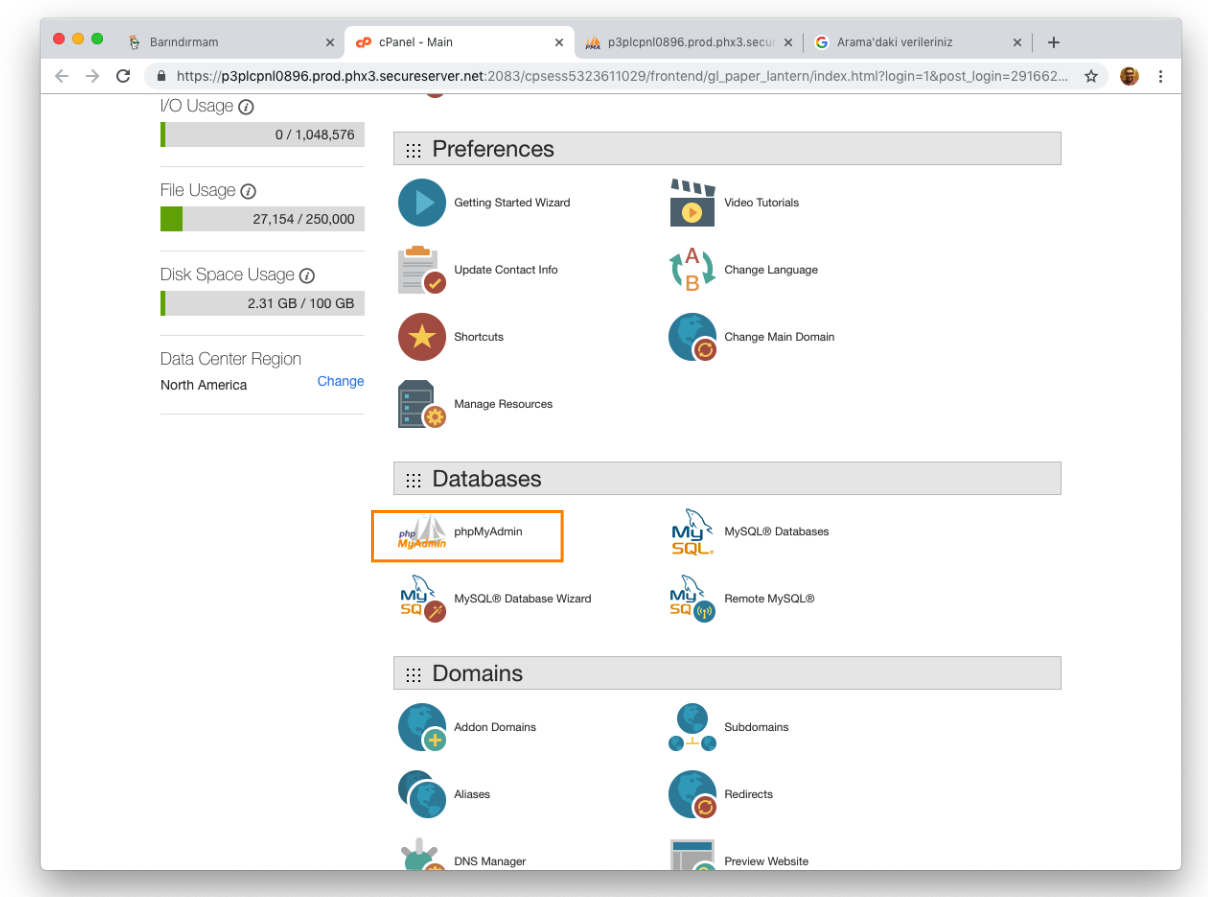
2. Select the database from the sidebar navigation panel of phpMyAdmin.
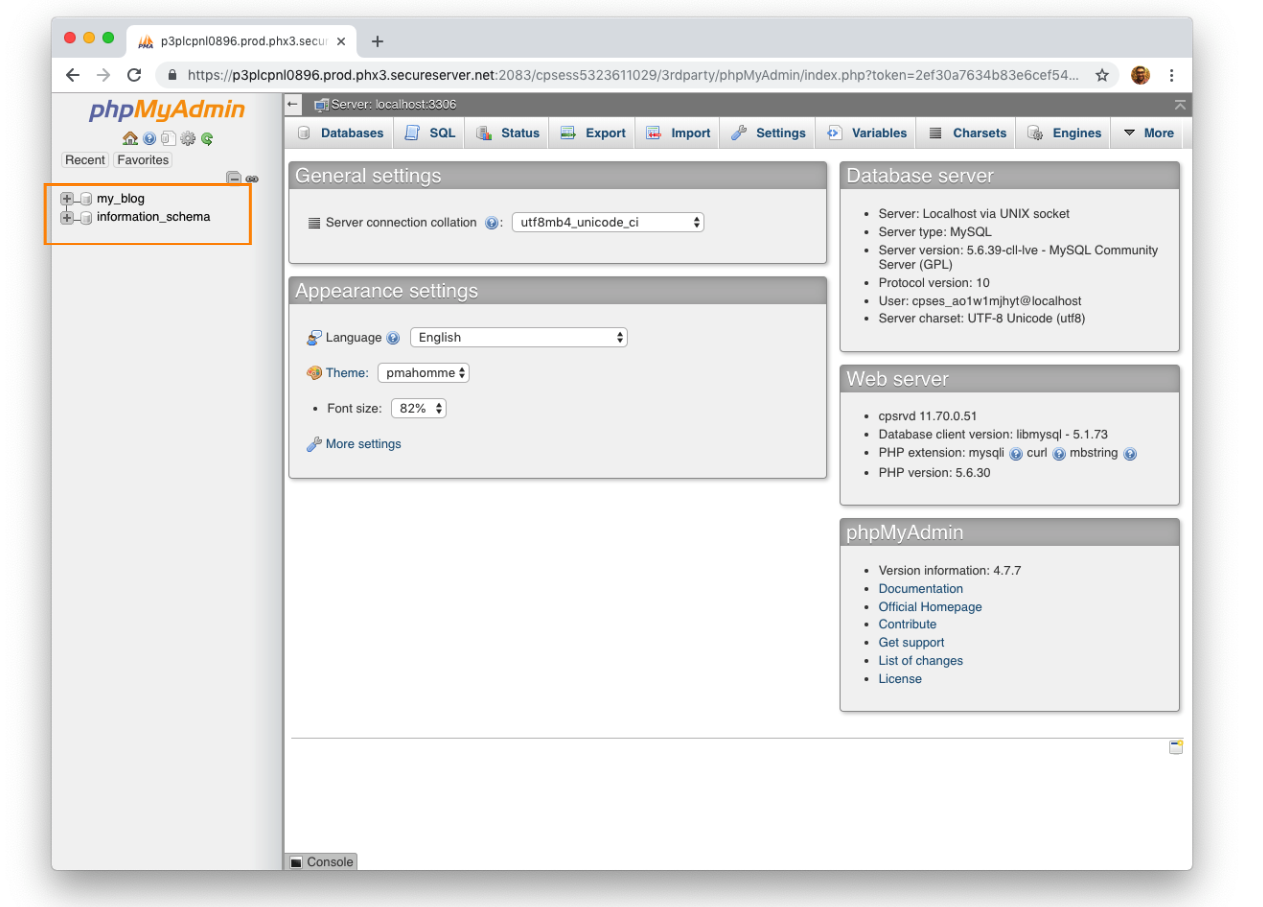
3. Click the Export link from the top navigation bar.
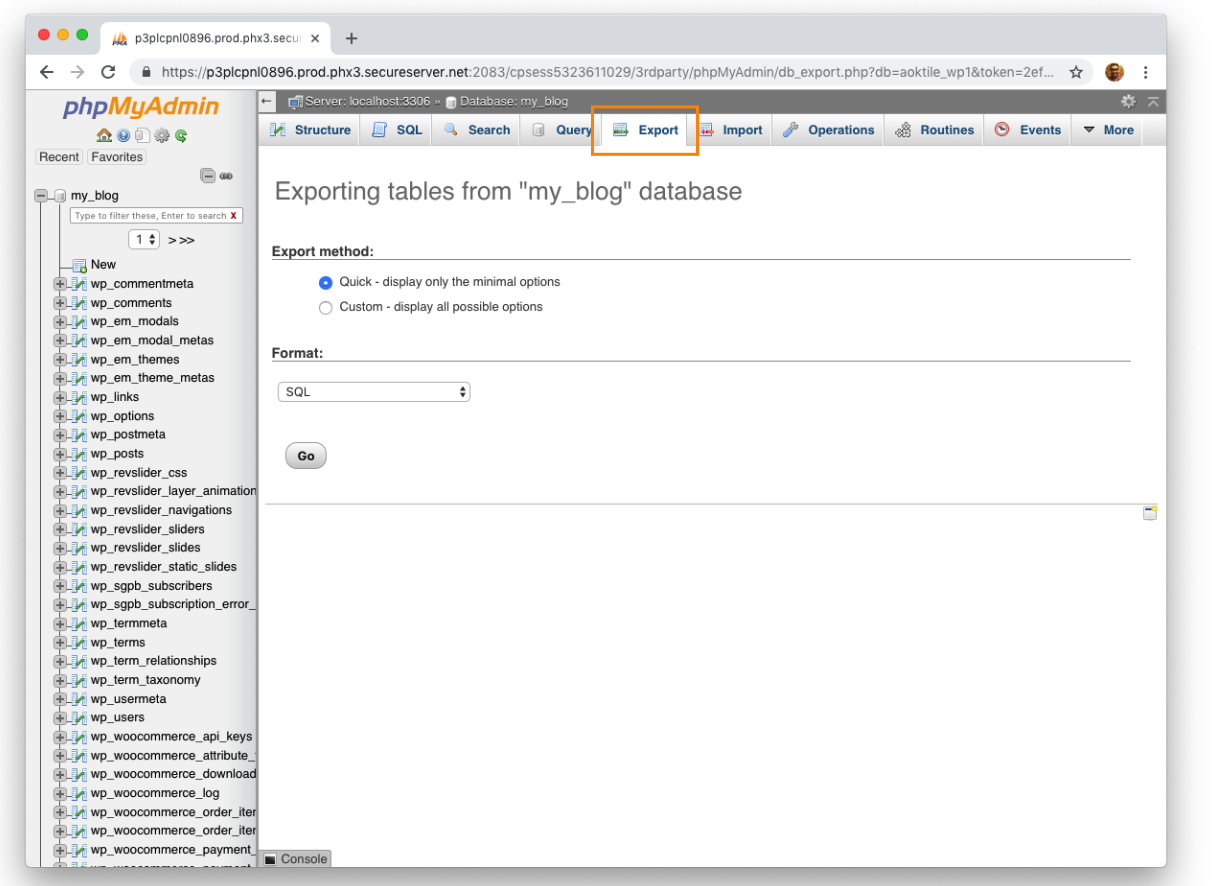
4. Choose Custom option in the Export page.
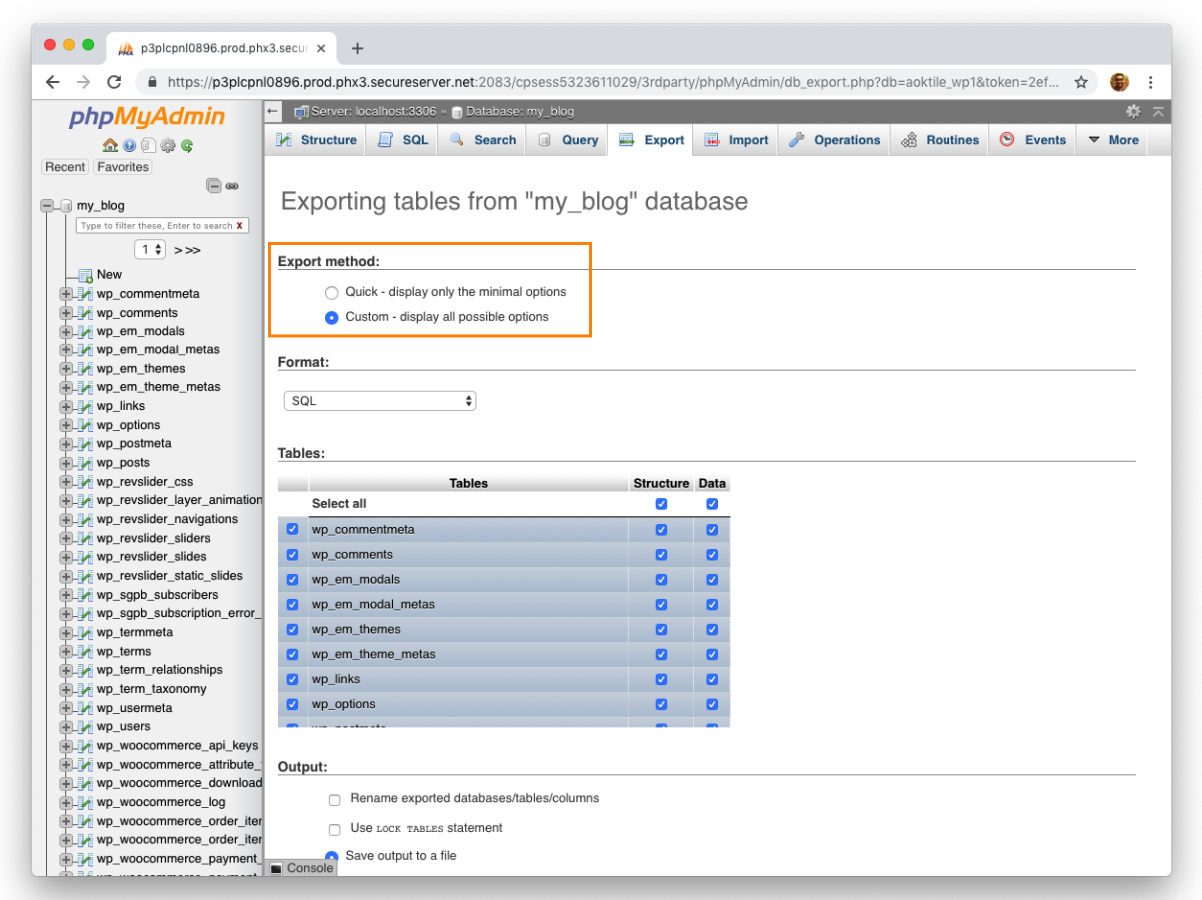
In the Export page, there will be two options; Quick and Custom. Let’s choose the Custom option.
5. Select the tables that you want to backup.
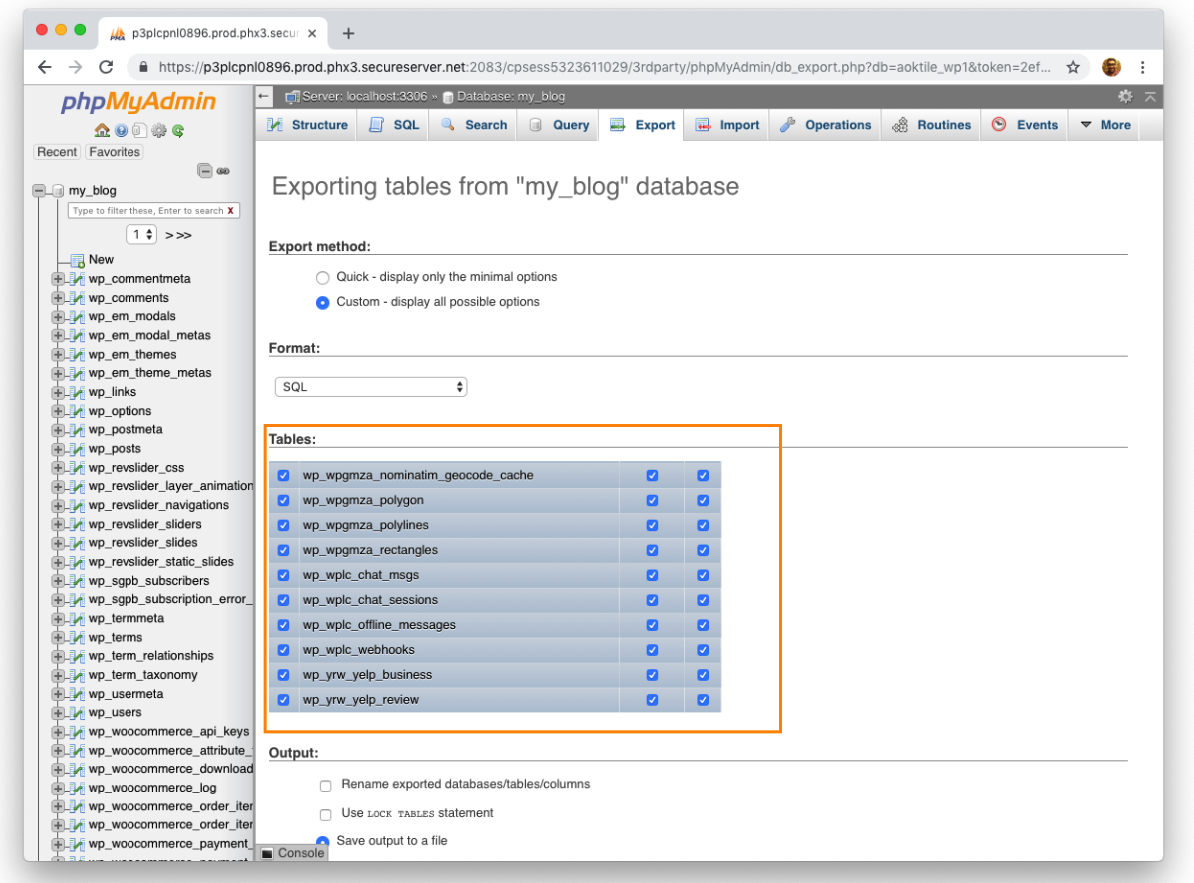
When you select Custom option, the page will allow us to select tables that we want to take backups. If you are not sure what to select, keep it as it; all tables are selected by default.
6. Choose gzipped option for Compression and keep the rest as is.
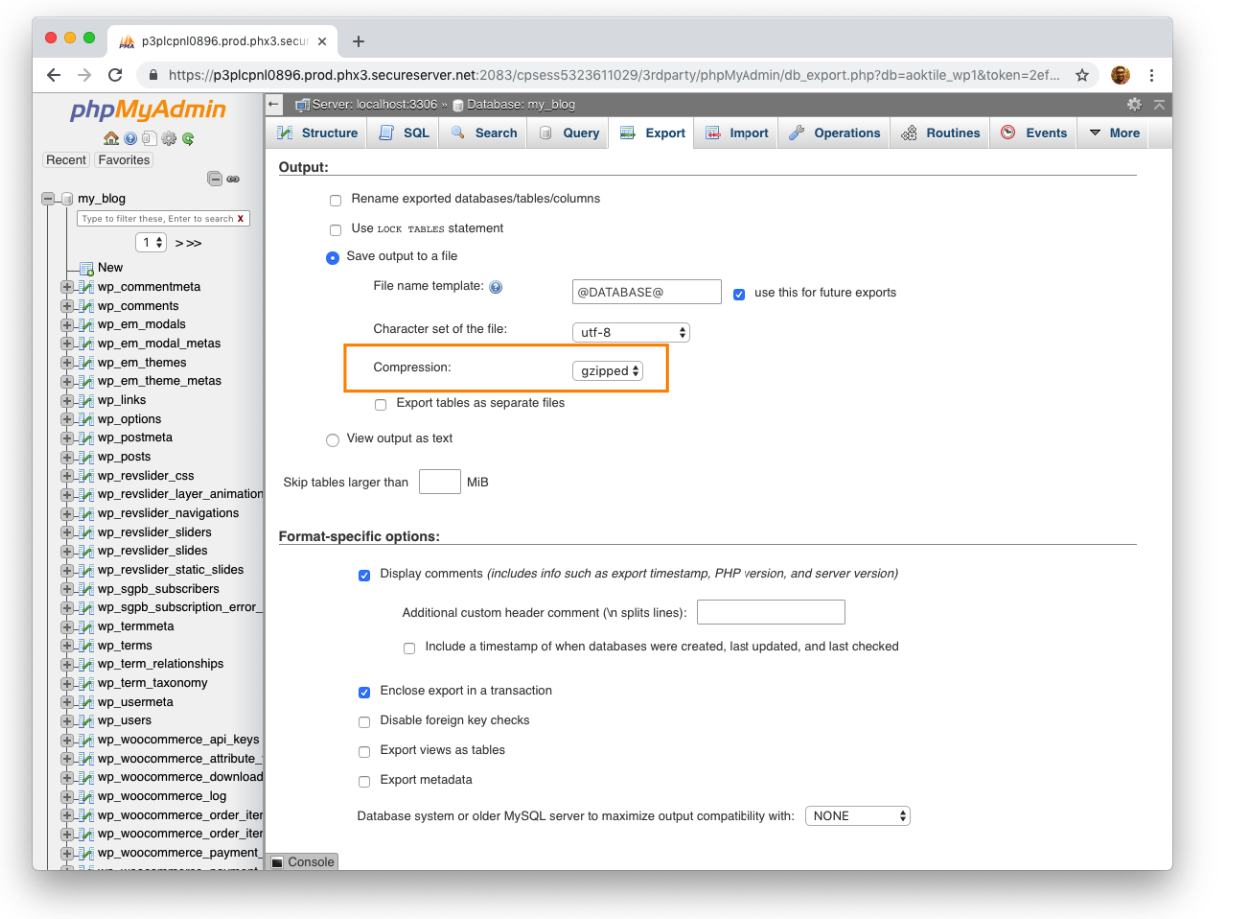
Next step is compression. In the center of the page, you will see the compression option that will gain us lots of time. Choose the gzipped option and keep the rest as is.
7. Click the Go button and then your backup file will automatically be downloaded.

We are ready to get our compressed database backup. Just click to the Go button and then your backup file will automatically be downloaded. The file name will be NameOfYourDB.sql.gz file. Depending on your database size, this procedure may take some time.
MySQL Export: How to backup your MySQL database?
Are you using someone else’s backup solution for your MySQL data? Do you care a lot about your data? Are you sure you’re getting a reliable, recoverable backup that’ll work for your business and your application, and won’t impact your critical processes while it runs? Here are ten questions you need to be able to answer.
10 things you need to know about backup solutions for MySQL















Send Comment:
117 Comments:
More than a year ago
10 ways yet: 1, 2, 4, 7, 8, 9 are all ways to invoke mysqldump.
I was hoping to get alternatives to ZRM (which isn't even listed).
The article is fine, just the title a bit misleading.
More than a year ago
The PHP is outdated - mysql_ lib was deprecated in PHP5 and removed in 7.
More than a year ago
I love this blog . This is one of the best blog i ever seen. It's all about what i'm searching for. I love to read this blog again and again . Every time i enter this blog i get something new. This blog inspire me to write new blog. I write a blog name tutorialabc.com. It's about sql,c#,net etc
More than a year ago
Number eleven and surely best for me - try dbForge Studio. Its MySQL Dump tool is very fast and works with great amount of data! Read more here:
More than a year ago
We would recommend our backup tool MySql Backup And Ftp (MySqlBF, ). MySqlBF allows to schedule backups using a Windows Task Scheduler or a custom windows service for a complex backup scenarios.
It supports connecting securely over an SSH connection and has such a unique feature as creating a backup via phpMyAdmin. The tool allows to archive, encrypt and save backups to HDD, FTP, Network or most popular cloud storage services (Dropbox, Amazon S3, Google Drive, SkyDrive, Box) and sends email notifications on success or failure.
More than a year ago
I have used automysqlbackup and Dropbox. It is very simple to install and configure:
More than a year ago
Why it not mention the software "Automatic Backup Scheduler for MySQL"
I think it a good software to back up and restore MySQL databases automatically.
The website is
Hope it helps you.
More than a year ago
I have created a backup script using Java. and executes it remotely. it successfully creates a .sql file in specified folder.
I wants a post that helps me to taking physical backup automatically. at another location.
Thanks every one for all theses posts. Thanks SAM.
More than a year ago
Noupe, thanks for showing so many MySQL backup solutions! Since this post is over three years old, I’d like to make some suggestions for your next article.
Sigh regard to the first option you mentioned, Amazon’s EC2 already has automatic backup. To this, I’d like to add the options offered by the increasingly popular Database-as-a-Solution (DBaaS) solutions, like Amazon’s RDS ( , and the lesser-known Xeround Cloud Database (), among others.
With Amazon’s RDS, aside from automated backups, you also have what they call “Database (DB) Snapshots”. According to their Website: “DB Snapshots are user-initiated and enable you to back up your DB Instance in a known state as frequently as you wish, and then restore to that specific state at any time.”
Xeround adds an alternative they call “Hot” Backups. You can do these “Hot” Backups online, without suffering downtime or interruptions. They let you choose between backups that either automatic or user initiated, on-demand. Does anyone here have experience with these “Hot” Backups?
More than a year ago
I'm pretty curious on what is your conclusion about quality/version control after a while that you wrote this.
More than a year ago
Do any of these solutions work if your data base is hosted externally? e.g. Go Daddy
More than a year ago
Thank you for the article and for all the post that I can read.
Grazie davvero!
More than a year ago
You can also use Auto Backup for MySQL Professional Edition software to schedule automatic backup which is totally free utility. The software can be used to backup MySQL database from the remote server runs under Any Operating Systems, including Unix, Linux, Mac OS, Windows and all.
More than a year ago
thank u but i am not understand u r format, so i request u send the simple format in"how to get the mysql backup"
More than a year ago
thank you for info,
I like to use a phpMybackup Pro,,,
happy blogging
More than a year ago
Hi again,
Sorry for the second post...
Here's my BASH script that I use to backup all of my mySQL databases on a local Linux (Turnkey LAMP 11.3) host:
#!/bin/bash
# Purpose: Backup all mySQL databases
# Author: Jason TEPOORTEN (JTepoorten@smsmt.com)
mysqldump -u root -pmissMantisBT --all-databases | gzip -9
More than a year ago
Hi,
Thanks VERY much for the helpful link.
I used #2. I changed the date format in the filename to reflect YYYYMMDD_HHMMSS as I find it easier to file sort in a directory simply using the filename.
Here's an example of the command I use in the root crontab:
mysqldump -u root -pmissMantisBT --all-databases | gzip -9
More than a year ago
I know best option use phpmyadmin to import and export .
More than a year ago
thanks, very helpful, this is what I was looking for.
More than a year ago
i hav a .csv file when I use the the load data infile it show me that u did syntax error this s not the correct syntax can anyone give me a clear syntax
More than a year ago
Nice collection for db backup.thanks
More than a year ago
thanks man its really helping
More than a year ago
I use Automatic MySQL Database Backup Plugin. It works with Unix and windows servers and doesn't use Cron Tabs either. The best part is that it doesn't backup if nothing has changed which really cuts down on server load since we run a few high traffic sites.
More than a year ago
There's another solution that is useful if you have, like me, multiple dbs to backup.
Here:
More than a year ago
@Peter
I love your 'git' method. I never would have thought of putting mysqldump and git together.
I'm not sure I'll implement it right now though because I'm spending so much time doing things in a quality way that I am wasting to much time on my business. i.e. I am using a backup system (CrashPlan) while using automysqlbackup. I was using git but the learning curve is a bit steep... however it's not an option NOT to use a version control system!
I've also got automated tests (code checker tests, doxygen documentation tests, unit tests, and functional tests via browser). A lot to take on. I know someone who didn't bother with any quality control and made a million creating Google Adsense websites! So I'm not sure if quality equals wealth... but hey... maybe I'm a dumbass!
Still let's see what happens ;-)
More than a year ago
here, I have developed this script, which can create backup of virtually any size of database.
Just have a look at it.
dbcare.webcare.pk
And the details are here
More than a year ago
does anyone know how to backup changes to the database say once per hour or even better whenever a certain table is updated ie an order?
More than a year ago
I needed a little variant for mysql data dump with single line inserts and no comments and no db create statement. Finally, the following command worked well:
root mysqldump --skip-extended-insert --skip-comments --no-create-info --no-create-db -u root -pgeoware123 iom3_00_04
More than a year ago
most way to backup need root privilege.
Way 6, using php to write a file, don't work.
More than a year ago
1 one should be like that
15 2 * * * root mysqldump -u root -pPASSWORD --all-databases | gzip
More than a year ago
Nice tips!
I will try some of them to backup my MySQL.
More than a year ago
The article has some good information but it would be better if you mention some tools too, running scripts and creating scheduled tasks manually can be complicated when managing several databases.
I would recommend MySqlBackupFTP ( . It is very simple to use and it has a free version that allows you to create scheduled backups.
This tool also has the option to export the backup to an FTP server so you don't need to run a separate script.
More than a year ago
Hey,
You can automate the backup of your MySQL databases if you're running cPanel. It finds all your databases and downloads them. The script doesn't FTP yet, but we'll release it shortly so that it does.
You can grab it here:
Cheers!
Paul.
More than a year ago
Good job.
I found another 100% PHP solution :
More than a year ago
Brilliant Post. I was actually looking for any desktop application that would save FTP details and schedule to run daily, make backup and store at my computer. Any idea? I once found one, but lost !! :(
More than a year ago
Good Job... your explication is great. It works fine....
greetings.
PD: The point 6 require more detail
More than a year ago
Many many quailty points there.
More than a year ago
Why the publish code that now explain what in it
1.include 'opendb.php'; (where is this file??????????)
More than a year ago
Hey Shane,
The biggest issue with MySQLDump is that it locks the database. "For each dumped database, lock all tables to be dumped before dumping them," from the documentation. The issue with replication is that it's a mirrored 1:1 copy of your data. If you lose data integrity on your master, your slave is corrupt within seconds. A backup is a snapshot of your data, thus if you replicate snap shots you can not compress and this could become another big issue (and that you've now got to find a way to replicate to a destination with multiple copies over time).
Overall, replication is a balancing technique (to me). Have you tried 1:many replications as a backup solution?
More than a year ago
Hello! I just wanted to ask if you ever have any issues with hackers? My last blog (wordpress) was hacked and I ended up losing months of hard work due to no data backup. Do you have any solutions to prevent hackers?
More than a year ago
Morning. This is enchanting article, guy. Danke. However, Im experiencing weird situation with ur Really Simple Syndication. I have no idea I cannot subscribe to it. Is there anybody having similar rsserror? Cheers
More than a year ago
Dont forget rsync and rsync over ssh ....
It's not the best way but fast and easy !
More than a year ago
I use this one as it makes backup and restore of all my databases very simple:
o/
More than a year ago
Hi,
I am trying to create mysqldump from java program
i write code like this
Runtime.getRuntime().exec("cmd /c C:/wamp/mysql/bin/mysqldump -u root -p march
More than a year ago
The formatting is a little off. I use the following, which I got from :
`date %m%d%y`
More than a year ago
Thanks dude ....very helpful
More than a year ago
Some good stuff here, but the author, in #6, doesn't seem to understand the difference between a database and a table. The title says "Backup a Database" but the technique backs up a table!?
More than a year ago
Great tip, thanks! I was looking for an easy way to do some backups.
More than a year ago
A relative recommended that I check out your site. I’m happy that I’m here.
More than a year ago
There is a new alternative java web application to backup mysql.Here is the link
More than a year ago
I watched a system about that on tv at the weekend. With thanks for your extra in-depth explanation
More than a year ago
Hello, I have read your article with interest and most tools described there is using mysqldump gzip. Also many of this tools doesn't check return code of mysqldump, which may be very dangerous (as a sysadmin you think you have perfect backup, but it is not true - your backup is corrupted), recently I have written small bash script which do necessary checks, here is the source: MySQL Quick Backup with bash script.
btw: Thanks for info about Auto MySQL Backup tool!
More than a year ago
Who knows what happens next... All I know is:
Left to themselves, things tend to go from bad to worse. :)
More than a year ago
Great ideas! I used to be having some porblems about what you already stated, Now I shall be higher!
More than a year ago
Very good list of ways to achieve a mysql backup. I personally use mysqldump, will find time to try other. Thanks.
More than a year ago
I always use mysqldump, and send backup to my home server and another backup server. simple and fast.
More than a year ago
Well I just discovered this site on Google for the first time today. I really think your site is good with excellent articles. Many thanks for the good read. Will add to my Bookmarks.
More than a year ago
How to Take incremental backup using script,please help me
More than a year ago
here is a shell script that i've created a while ago. It creates a backup daily(needs cron) where you can specify the file's lifespan. It also includes a monthly archiving every first of the month.
More than a year ago
I have been using mysqldump for years now with rather a huge mysql installation. The best improvement I made to avoid downtime during backups due to table locking was to set up a replication server and perform the dump on that. Setting up replication is a whole different animal, but the mysql documentation is good.
More than a year ago
Thanks Bro Nice tut...
More than a year ago
MajorMUD Control Panel is a PHP website designed.
More than a year ago
Webmin has a scheduled back up service available which is easy to use / set up. It does not allow for rotation of files (that I can see).
More than a year ago
I agree with that.
More than a year ago
What is the best way to backup MYSQL so that the tables dont get locked, aka other than mysqldump on a ubuntu server runing mysql?
More than a year ago
Here is a GUI to auto backup mysql to local path or remote ftp server.
NBackupMySQL :
More than a year ago
Your example crontab line has the "data ' %m-%d-%Y'" instead of "date ' %m-%d-%Y'". That's why it doesn't work.
More than a year ago
I totally agree with you Sam. Sometimes people choose to complain more than to appreciate what has been contributed because they don't 'understand' the article's title. Anyway, keep up your good work!
More than a year ago
What a great article! I actually created a script to email me a backup dump of a chosen MySQL database. See it here:
More than a year ago
I never knew I would be equipped to jump high so fast. Can anyone gift me anymore suggesstions?
More than a year ago
Fantastic your ability as a copywriter are amazing
More than a year ago
Comfortabl y, the article is in reality the greatest on this noteworthy topic. I concur with your conclusions and will eagerly look forward to your upcoming updates. Just saying thanks will not just be adequate, for the exceptional lucidity in your writing. I will instantly grab your rss feed to stay privy of any updates. Fabulous work and much success in your business efforts!
More than a year ago
Intimately, the post is really the greatest on this notable topic. I agree with your conclusions and will thirstily look forward to your future updates. Just saying thanks will not just be enough, for the extraordinary clarity in your writing. I will right away grab your rss feed to stay informed of any updates. Admirable work and much success in your business efforts!
More than a year ago
dear sir,
i am using 2003server as domain and oracle database installed in domain if i do bdc how i can backup every secound from pdc to bdc
More than a year ago
For god sake people stop using FTP when SFTP is so darned easy to use and automate!
More than a year ago
I agree with PS, Shane and Sarah...All of these solutions use mysqldump, which can bring your server to a halt while the script is running. For LARGE databases, this could be mean your website going down for a few minutes every day. These solutions are great for smaller databases, but not scaleable if your database has millions of records.
Also, Kingsly. Replication may be an HA solution, but it can also be used to backup the database without interrupting service to your website visitors...
More than a year ago
I used this info in combo with a script at . It seems to work. After you make the shell script, you can also easily execute it manually or automatically using php shell_exec. Works great.
More than a year ago
Nice listing though some of them are old but very helpful to bookmark for the future need :)
More than a year ago
Backing up is so important but even more important is to save the backup OUTSIDE the server.
Email can be a good solution for small db but for db larger than 10MB it is better to use third party services
More than a year ago
PS.
I guess people that doesn't post their names like to make stupid comments.
The title on this page says "10 Ways to Automatically
More than a year ago
xmlsamurai As posted here it works fine for me.. Your system must be different or you are doing something wrong. Next time you want to post try using terms like.. It didn't work for me.. This way you don't openly say that the instructions is wrong or not working that someone so kindly posted on the web .
I have tested it and it does work.
More than a year ago
nicely listed... i was not knowing all of them... thanks :)
More than a year ago
hey Vivek -
I like your method the best. I found /usr/sbin/logrotate is installed by default in OpenSolaris (SXCE b123) so I have found me a "export
More than a year ago
You can simply use MySQL Administrator to schedule daily backups of all your remote databases. It's a MySQL product and is free and simple to use.
More than a year ago
Thank you so much! Excellent!
More than a year ago
Umm, how about hot backups?
More than a year ago
great stuff
More than a year ago
Very useful tips. Automating this process is most ideal. Setting up a cron job would be very useful. Make sure you have proper permissions in performing some of these mysql commands.
SQLyog as mentioned above is a very useful tool but its not free unfortunately.
More than a year ago
Nice one. Web developers and admin can use these to backup their online database.
More than a year ago
actually i scacely use Mysql except in CMS,but CMS sets mySQL already ,
More than a year ago
none of them are correct. fail.
More than a year ago
Thank you!
More than a year ago
The cron for linux is great too, I think I'll throw that together tonight.
More than a year ago
Really cool, I get asked this all the time. We will definably link to your article.
More than a year ago
I am still rookie in working with databases, very useful.
More than a year ago
Thanks! You're saving my life again ;)
More than a year ago
@Sarah
Replication is a HA solution, not a backup solution.
a "delete * from tablename" will wipe out your "backup" too.
More than a year ago
Wow, I was kind of expecting more than just mysqldump, mysqldump, and mysqldump. Has any tried replicating the Mysql DB as a backup solution??
More than a year ago
this is some good information. Thanks
More than a year ago
My MySql databases are on a hosting provider, here's the tricks I use.
1) Via ssh, connect to host, issue mysqldump or your dump script(s), have them dump to a non-quota'd location, like /tmp, or /dev/shm (if there's enough ram on the remote box). My scripts use:
-a -Q -q -l --add-drop-table --add-locks --complete-insert -uusername -ppassword database_name
More than a year ago
In many circumstances you would want to force the MYSQL dump to continue past any error with '-f' so that you get the full database even if it contains oddness. Otherwise there is a chance it will crash out and give you only a fraction of your data.
More than a year ago
brilliant. Thanks for a useful list :)
@john woah, what do you have against MySQL?
More than a year ago
Wow, I was kind of expecting more than just mysqldump, mysqldump, and mysqldump. Has any tried replicating the Mysql DB as a backup solution?
More than a year ago
if you're stuck using mySQL.... sorry
More than a year ago
easier:
15 2 * * * /usr/bin/mysqldump –opt –all-databases -u root -pPASSWORD
More than a year ago
We use version control to backup our database, saving us from having to rotate the dumps. This means we can go back in time as much as we like.
We use Git right now, but any SCM would do actually.
You do need to initialize a Git repository at /path/to/dbbackups first. Then add a cron tab that calls the backup script.
More than a year ago
Currently I use zmanda mysql backup. I use the comunity version
More than a year ago
Currently I just use #11 but I'm going to look into #1 and #8.
Thanks for reminding me that I need to figure out a nice way to do this. :)
More than a year ago
Not a single one of these options will scale past a small to moderately sized database.
More than a year ago
Dump a remote db locally in one easy line:
ssh user@server "/usr/bin/mysqldump -u user -p password database_name" | dd of=/where/you/want/the/dump.sql
More than a year ago
This list is incomplete imo, i'd reather see examples of using diff for db backups. This doesnt scale at all.
More than a year ago
Thank you noupe!! Nice list of resources to be used in different applications.
More than a year ago
Nice list list of tips. Number 6 and #7 is handy.
More than a year ago
This is what I use - Perl script to backup mysql databases
More than a year ago
I use SQLyog Enterprise. It can connect over SSH and I can schedule my backups. It is not free though :-(
More than a year ago
How about using logrotate. Its the best way to keep backup only for X days. Also use rsync to transfer the file to a remote server just for another backup.
/var/backups/db.sql.gz {
daily
rotate 14
nocompress
create 640 root adm
postrotate
mysqldump db -u user -psecret
More than a year ago
Your automatic backup script for Linux will not work, use this instead in the crontab:
15 2 * * * /usr/bin/mysqldump --opt --all-databases -u root -pPASSWORD