













Which one is better for manipulating text, Photoshop or Illustrator? There is no clear and defined answer. What is clear is that Illustrator, being mainly used used for creating seamless vector images, allows the user a greater degree of accuracy, control, and precision. Of course this depends on the hand controlling the mouse. So, if you are looking to simply manipulate text, then Photoshop would be your choice. If your goal is to create beautiful and original typographic art, then it has to be Illustrator.
In this Illustrator tutorial round-up, there are over 40 text effects, or if you prefer typographic effects, to help you learn new techniques and expand your typographic repertoire.
Of course, as any good graphic designer knows, being knowledgeable in one graphic editor limits your creativity. To accomodate this, we have included some tutorials that will require the additional knowledge of Photoshop and even some 3D software to give your text that added awesomeness.
Pro Tip
Sign up for a free Jotform account to create powerful online forms in minutes — with no coding required.
Illustrator Text Effect Tutorials
Smokin’ Western Type Treatment
In this easy tutorial, you will create a western type treatment mainly using Illustrator’s Effects. Using the effects from this tutorial, you can easily apply them to other type treatment and logos.

3D Typography
In this in-depth tutorial you will undoubtedly learn new techniques, as well as finely tune some old. Upon completeing this intense walk though, you will be able to explore even new ways of creating fresh and unique typefaces.

Ornate Lettering
In this tutorial you will learn how to create ornate lettering from sketches and vectors in Illustrator, make it three-dimensional in 3ds Max and fine-tune the final result in Photoshop.

Add Decorative Glamour to Your Ordinary Script Font
Rather than choosing a fancy font from some of the free font sites, this tutorial shows you how to be creative and give some extra sparkle to your ordinary font, creating a typographic design which can stand by itself.

Stunning and Detailed Typography
In this tutorial you will create a text effect inspired by graphic designer Sumeco, whose typographic style is very detailed, organic, and often uses 3d renders to assist the visual appearance of the type.

Giving Your Flat Text Some Depth
This tutorial shows you a technique to adding shadow to your text and giving your boring and flat text an extra dimension and bringing it to life.

Bling Bling Text Effect
In this tut you will learn how to create the ‘Bling-Bling’ texture and how to apply it to any text within Illustrator.

Tackle Twill
Tackle twill is a widely used embroidery technique that involves sewing down nylon twill to a garment with zig zag stitching. This tutorial will show you how to recreate the tackle twill look with Illustrator’s Appearance palette.

Swirly Type
Using free fonts, some brushes, and gradients you will learn how to create this swirly type treatment.

Trendy Retro Type
Recreate this trendy retro type treatment , using a free font, gradients, blends, and some scatter brushes.

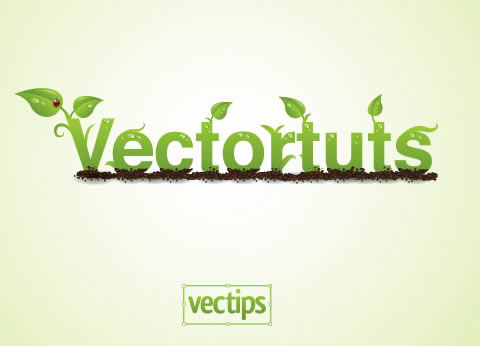
Environmentally Friendly Green Type
In this Illustrator tutorial, you will be shown how to create a Green type treatment, that works great for logos and other design elements.
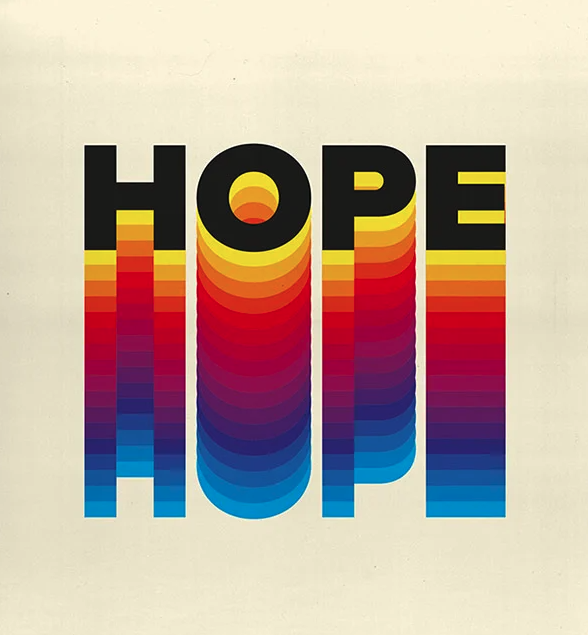
Retro Style Rainbow Text Effect
BluePrint Type
Learn how to recreate this impressive, but simple, blueprint text effect, using a blend of live effects, filters, and a little gradient mesh.

Gradient Strokes
This technique uses the Appearance panel and effects to create editable gradient strokes in Illustrator, and create a simple yet effective text effect.

Cool Water Effect
You will learn how to use the mesh tool to create the water droplets and use the symbol sprayer tool to disperse the water droplets.

Fun Eye Catching Text
In this tutorial you’ll explore the many ways you can manipulate text in Illustrator. By combining color and effects, you can create really fun and eye-catching text in no time at all.

Warp Text Inside A Heart
In this tutorial, you will learn how to combine the text wrap and heart shape together to achieve the text effect.

Old School Type – Line Gradients
You can use this effect with any typeface or font by following the principles outilined in this tutorial, and add that cool “line gradient” effect that you see inside the actual lettersn giveing the text an old-school or vintage feel to it.

Dream Design with 3D Typography
In this tutorial, you’re going to create a 3D Typography based design, with all the elements revolving around the centerpiece and theme: dreaming.

Sticker Text and Graphic Effect
In this tutorial, you will be shown how to create, the popular, sticker style effect in Adobe Illustrator.

Letterpress Styled Text
Utilizing the Appearance panel and Graphic Styles, you can quickly and consistently apply this style to any editable text and other vector objects and create, the popular, the letterpress effect.

3D Text and Paint Effects
In this tut, you’ll learn how to employ 3D extrusion techniques by creating elements in Illustrator for import into Photoshop; you’ll also hone your brush and drawing skills, and learn how to achieve this wonderfully subtle, cloudy background and the bold but not too in-yourface highlights.

Stunning and Bold 3D Text
Learn a method for creating attractive 3D text that features some beautiful lighting and textured effects, using Adobe Illustrator for the text and Photoshop to help finish the effect.

Cartoon Style
In this tutorial, you will learn how to create the cartoon style of text often seen on cereal boxes.

Grunge Effect
This is a simple tutorial which will show you how to give grunge effect to your text , the beauty of using this technique is that you get text that can be scaled to any size without loosing its clarity.

Turn Any Font Into a Sketch Font

Dynamic Burberry Text
You will learn how to create dynamic art, vector art that isn’t destructive to the vector paths and give the text a burberry style.

Stylish Colorful Text Effect
In this tutorial you will be shown how to make this cool colorful text effect using a vector image, and learn how to use the appearance palette and how to use the blending mode effectively.

Type Tecnique Using Shapes
In this tutorial you will learn a technique for using shapes as type, and using this to create a very impressive text effect.

Zee Logo

Tug and Twirl Text
In this tut you will learn a technique for converting Illustrator text to outlines.

Distress Text
Traditionally, if you wanted distressed-looking text in your designs, you either had to have a typeface that was designed to look that way or you had to apply filters to the text in Adobe Photoshop. With Adobe Illustrator, you can use the Live Trace feature to achieve a similar effect.

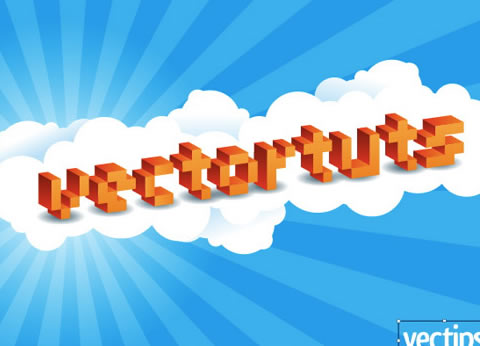
Vibrant 3D Pixel Type
In this tutorial,using a free font, gradients, and Illustrator 3D filter, you will easily create this type treatment that you can apply to many other fonts.
3D Lighted Text

Textured Grungy 3D Type Design
In this tutorial you’ll look at creating a cool grungy design based around some abstract 3D type, then apply a few finishing touches to really bring the design to life.

Playful Yet Robust 3D Letter Design

Rocky 3D Text
In this tutorial you will learn how to distress your own type, turn it into a 3-dimensional shape and then apply some hand drawn styling to it.

Emboss Text Effect

Creating Swirly Type
In this tutorial you will explore the “Average” command in Adobe Illustrator, and learn how to use it to create abstract swirls using relatively simple methods and apply it to type.

Working with Type in Illustrator
This tut focuses on using type in Illustrator to create a bold, eye-catching message, useing a ‘type as image’ style of typography. This style is both popular and effective for communicating strong messages visually.
This tutorial is not so much a text effect, it is more of an indepth look at typography within Illustartor.

Create 3-D Text with Extreme Lighting
In this tutorial you are going to take an object/text and change it from 2-D to 3-D and then give it some realistic effects. You will be using Illustrator to create the object, then bring it into Photoshop to add highlights and shadows.

Stunning, 3D, Sunset Type Illustration
Using multiple platforms you will learn how to create a warm and sunny typographic treatment. You’ll use C4D (or any other 3d software) to create the text, Illustrator for several decorative motifs, and Photoshop to bring them all together.

Making an Ambigram
An ambigram is typographical design where the word looks and reads the same when it is upside down, or flips to create a whole new word. There are many types of ambigrams, in this tutorial you will learn the most basic type, a rotational ambigram – the visual representation of a word that when rotated 180 degrees (i.e. flipped both vertically and horizontally), it spells the same word as before.

Glyph Panel
Glyphs would not be the first thing you would think of when setting out to create a cool text effect, is it? Used properly, glyphs can be quite effective, and in this tutorial, you’ll learn how to create a font monster made entirely out of a single typeface.














Send Comment:
46 Comments:
More than a year ago
Great, Thanks for the Tutorial
More than a year ago
Great work to do practise.thank you so much
More than a year ago
These are great tutorials thank you. I’m looking for an ipad app that will allow me to add text and than create outlines so I can manipulate the text. This option is available in adobe illustrator full version but I haven’t found it in any of there dumbed down apps and I prefer working from an iPad. Any ideas?
More than a year ago
thank you so much
More than a year ago
Very comprehensive collection! Was looking for logo inspiration for a client using typography and found it! Thanks for sharing!
More than a year ago
Love any type of tutorial that involves typography. My only problem with a tutorial is to make sure the text on the tutorial itself that we are creating is spelled correctly…check out the “NO VACANY” I would hope they meant “NO VACANCY” OOPS!
More than a year ago
Love these! Nice work man. Used a couple today already.
More than a year ago
Thank you very much for sharing, just what I was looking for.
More than a year ago
thank u very much, these tuts r good.
More than a year ago
very nice effect and cool :). thanks for sharing :)
More than a year ago
Excellent Designs. Thanks for sharing
More than a year ago
Wow! Thank you so very much for taking the time and love to post these wonderful tutorials for someone like me. How generous you are!
More than a year ago
thanks for sharing.great tutorials!
More than a year ago
awesome!!
thanks for sharing it! :)
More than a year ago
Some cool stuff here. I haven't seen a few of these.
We have a few you might like too :)
More than a year ago
cool....very nice collection
More than a year ago
This is a really cool collection of tutorials. Thanks for sharing.
More than a year ago
really awesome tutorials. i like all of them...
Thanks
More than a year ago
wow., some awesome tuts..
Thanks..
More than a year ago
I love the collections they all look so amazing, especially the environmental and the dream design, love, love love it all.
More than a year ago
Great list! I especially enjoy the tutorials that combine Illustrator and Photoshop with 3D programs to really bring the type to life.
More than a year ago
Some i have seen before, but there are some interesting new ones, thnx for the tutorials
More than a year ago
these tutorials are AWESOME!!!!!!!!!!!!!!!
More than a year ago
very nice, thanks a lot
More than a year ago
Love any type of tutorial that involves typography. My only problem with a tutorial is to make sure the text on the tutorial itself that we are creating is spelled correctly...check out the "NO VACANY" I would hope they meant "NO VACANCY" OOPS!
More than a year ago
thanks!
great tutorials
More than a year ago
l like the list very good and nice to read.
More than a year ago
I'm really happy to have my cartoon style cereal box logo included in your list! Thanks!
More than a year ago
I am not using illustrator currently but after seeing this i am going to use that
More than a year ago
Paul, this is awesome. Thanks for all the tutorials!
More than a year ago
Great article. I appreciate the time you took to pull all of this together.
Question: Have any of you Illustrator experts tried Inkscape, the open source software that also is made to create vector images? Does Inkscape compare in quality to Illustrator?
I use Photoshop for almost everything. And I have only fooled around a little in Inkscape -- it was a little buggy when I used it. Just wondering what you think.
George
More than a year ago
Love Stumble Upon. Thanks for the great info!
More than a year ago
GREAT tutorials, man! Thannx!
More than a year ago
Wow!..Thank you for this. Will come in handy.
More than a year ago
thanks for this great post.
More than a year ago
Wow, this covers just about every type of text effect you could possibly want. Nice job collecting!
More than a year ago
Thanks for Sharing, some are very "popular" but also there's others that i've never seen before :D
More than a year ago
Excellent collection!
More than a year ago
wonder....!
More than a year ago
Nice one:) Seen a couple of these, but there are some nice additions. Thanks
More than a year ago
very nice .ai tutorials, thanks a lot..
More than a year ago
wooww it s wonderfull
More than a year ago
Very good collection and usefull.
More than a year ago
I am sooo excited to try some of these tuts - especially explore the 'Working with Type in Illustrator' one.
Thanks for the awesome resource.
Stumbled AND Bookmarked.
Cheers,
Windy May
More than a year ago
very nice collection :)
More than a year ago
Thanks, very nice tutorials ;)