
CSS Typography: Contrast Techniques, Tutorials and Best Practices
The main advantage of elegant CSS typography lies in its ability to be both attractive and improves the user experience. When chosen wisely and used carefully, it can be very effective to support the overall design. There are many outstanding examples of how we can do this, and below you will find some of the best ideas and tips when it comes to using Fonts and typography in your CSS based sites.
Typographic Contrast and the web This article has reviewed the important principal of typographic contrast as presented in a brochure written fifty years ago by the canadian typ[ographer Carl Dair. He presented seven principals ranging from type size to the direction of type on a page. Though written for people whose profession was print, Carl's words are equally a[pplicable in a medium he never experienced which is web design.
Typographic Contrast and Flow Here are seven basic methods on how you can create typographic contrast.
The Elements of Typographic Style This website steps through Bringhurst’s working principles, explaining how to accomplish each using techniques available in HTML and CSS. A practical guide to web typography! 5 Principles And Ideas Of Setting Type On The Web Principles, rules and ideas for approaching Web typography decisions by Sean Hodge on SmashingMagazine.
Making Headlines With CSS With a dash of design, we can utilize CSS to stylize those Web page headers to catch the reader’s eye and encourage them to read on.
10 Examples of Beautiful CSS Typography and how they did it… There are a lot of great sites out there that have beautiful Typography using only CSS, however simply looking at them is only half of the picture. If you want to know what did they do, and how/why does it result in beautiful type? Check out this interesting post.
Heading Style gallery Want something a little more stylish for your content headings (h1,h2,…) than a different font or color? Try one of the heading styles listed here to spruce up your content.
CSS StyleFun with CSS Different examples of amazing Text styled with CSS.
BluePrint’s typography.css file sets up some very nice typography styles that create a beautiful baseline grid. This post came in handy to show you how to configure Your Font-Size and Baseline to your desired value.
YUI Fonts CSS
YUI Fonts CSS file offers cross-browser typographical normalization and control. Checkout their examples section to see it in action.
Typetester The Typetester is an online application for comparison of the fonts for the screen. Its primary role is to make web designer’s life easier.
CSSTypeset Coverts your wysiwyg text formatting to css...in real time
Typography For Headlines A great collection of links to more than 100 headlines around the Web in a unique and creative way.
Websites with Excellent CSS Typography There are some websites out there that have managed to create outstanding web designs through the use of typography. They are simple, clean and communicative. Have a look at some of them.
1. Eight Seven Principles of Typographic Contrast
You can direct the reader’s attention to important parts in your layout and at the same time enhance the visual appearance by creating contrast. Here are different css properties for common typographic effects.Type Size
font-size
White Space
line-heights, letter-spacing, word-spacing
Typefaces
font-family
Case
text-transform
Style
text-decoration, font-style
Weight
font-weight
Color
color
Alignment
text-align, float
Typographic Contrast and the web This article has reviewed the important principal of typographic contrast as presented in a brochure written fifty years ago by the canadian typ[ographer Carl Dair. He presented seven principals ranging from type size to the direction of type on a page. Though written for people whose profession was print, Carl's words are equally a[pplicable in a medium he never experienced which is web design.
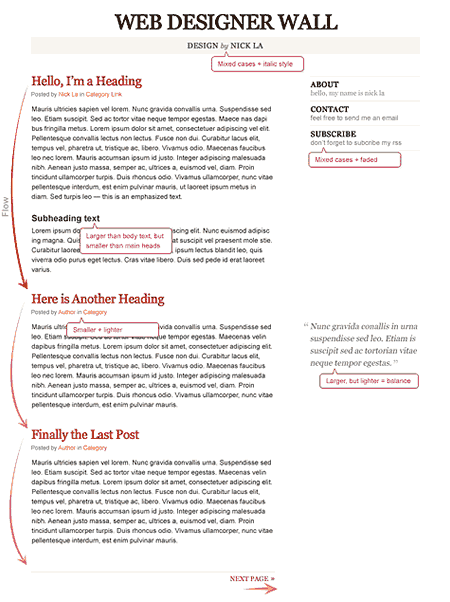
Typographic Contrast and Flow Here are seven basic methods on how you can create typographic contrast.
The Elements of Typographic Style This website steps through Bringhurst’s working principles, explaining how to accomplish each using techniques available in HTML and CSS. A practical guide to web typography! 5 Principles And Ideas Of Setting Type On The Web Principles, rules and ideas for approaching Web typography decisions by Sean Hodge on SmashingMagazine.
2. Common Typography Techniques with CSS
CSS Heading Type
How to use headings in HTML A great tutorial by Alen Grakalic of CSSGlobe explaing what is the meaning of headings, how to use them and what are the "Don'ts" when using heading tags.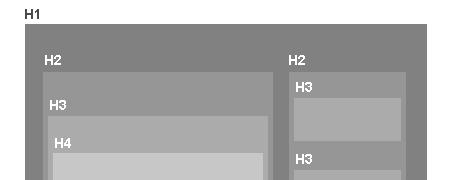
Making Headlines With CSS With a dash of design, we can utilize CSS to stylize those Web page headers to catch the reader’s eye and encourage them to read on.
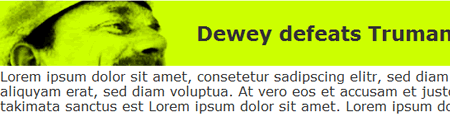
h2
{
	margin-bottom: 0;
	padding: 25px .5em 25px 250px;
	background-image: url(examples.png);
	background-repeat: no-repeat;
	color: #333;
	background-color: #cf0;
}
h2:hover
{
	background-color: #fc9;
	background-image: url(examples.jpg);
	background-repeat: no-repeat;
}
10 Examples of Beautiful CSS Typography and how they did it… There are a lot of great sites out there that have beautiful Typography using only CSS, however simply looking at them is only half of the picture. If you want to know what did they do, and how/why does it result in beautiful type? Check out this interesting post.
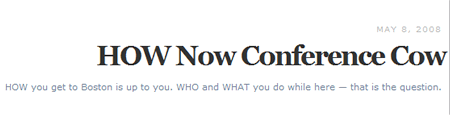
#DATE{
	  font-size: 85%;
	  text-transform: uppercase;
	  letter-spacing: 1px;
	  color: #bbb;
	  font-size: 10px;
	  font-family: "Lucida Grande", Verdana, Helvetica, Arial, sans-serif;
	  font-weight: 100;
	 }

#HEADLINE{
	font: bold 34px "Century Schoolbook", Georgia, Times, serif;
	color: #333;
	line-height: 90%;
	margin: .2em 0 .4em 0;
	letter-spacing: -2px;
	}

#TAG{
	color: #76879b;
	font-size: 10px;
	margin: 5px;
	font-family: "Lucida Grande", Verdana, Helvetica, Arial, sans-serif;
	font-size: 11px;
	}
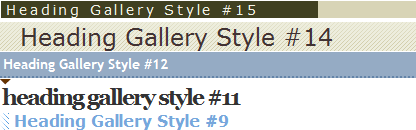
Heading Style gallery Want something a little more stylish for your content headings (h1,h2,…) than a different font or color? Try one of the heading styles listed here to spruce up your content.
Creating Dropcaps Using CSS
CSS Magazine Style Drop Cap The Drop Cap can be close to the size of the title text or bigger. So you need to force the first big letter to span about five lines.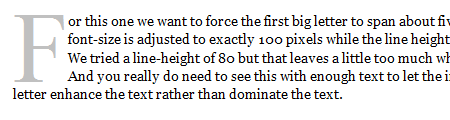
Paragraphs in Web Typography
The Paragraph in Web Typography & Design Paragraphs are punctuation, the punctuation of ideas. After selecting a typeface, choosing the right paragraph style is one of the cornerstones of good typography. This is a brief inquiry into paragraph style for the Web. You can also check their 12 Examples of Paragraph Typography here.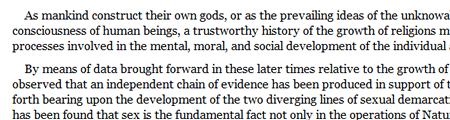
/*
First line flush left
Subsequently two lead indent, no boundary, justified
*/
p {
font-size: 1em;
line-height: 1.25em;
margin: 0;
text-align: justify;
}
p   p {
text-indent: 2.5em;
}
Sizing Text in CSS
How to Size Text in CSS Ems can be tricky to work with, especially when nesting elements deeply, as it can be hard to keep track of the maths. However, commenting your style sheets well and styling elements from the body inwards can keep things easier to follow. Learn how to size nested elements using the body as the starting point.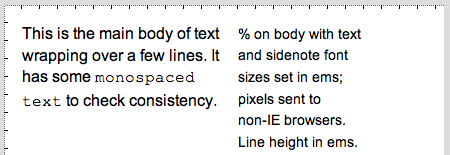
<style type="text/css">
body {
    font-size:100%;
    line-height:1.125em;
}

.bodytext p {
    font-size:0.875em;
}

.sidenote {
    font-size:0.75em;
}
</style>

<!--[if !IE]>-->

<style type="text/css">
body {
    font-size:16px;
}
</style>

<!--<[endif]-->
Text Sizing
3. Advanced Typography techniques
Advanced Typography techniques using CSS There are still many rich typographic abilities of CSS that are not well documented. Here is a great example of what you can do by combining and tweaking type using css. Checkout the advanced css typography example page and look through the source code.
Anatomy
Gray's
h3.gr {advanced_type.htm... (line 54)
border-bottom:10px solid #CC0000;
color:#999999;
float:left;
font-family:Impact,Arial,Verdana;
font-size:500%;
font-weight:100;
margin:0pt;
text-transform:uppercase;
}
h3.gr2 {advanced_type.htm... (line 55)
color:#999999;
float:left;
font-family:Impact,Arial,Verdana;
font-size:500%;
font-weight:100;
margin:25px 0pt;
position:relative;
text-transform:uppercase;
}
CSS StyleFun with CSS Different examples of amazing Text styled with CSS.

4. How to Customize Typography with CSS Frameworks
BluePrint CSS How to: Customizing Typography Baselines
BluePrint’s typography.css file sets up some very nice typography styles that create a beautiful baseline grid. This post came in handy to show you how to configure Your Font-Size and Baseline to your desired value.
YUI Fonts CSS

YUI Fonts CSS file offers cross-browser typographical normalization and control. Checkout their examples section to see it in action.
5. CSS Typography Tools and Wizards
CSSType A simple tool that create the text CSS coding for you & lets you preview it as you do it!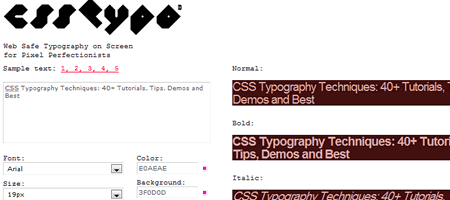
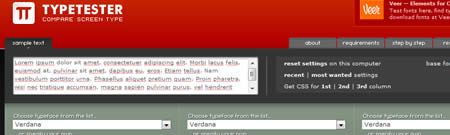
Typetester The Typetester is an online application for comparison of the fonts for the screen. Its primary role is to make web designer’s life easier.
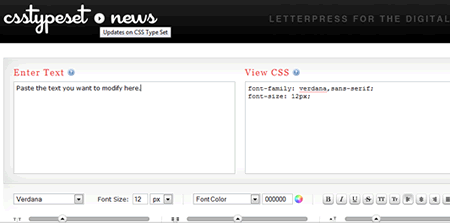
CSSTypeset Coverts your wysiwyg text formatting to css...in real time
6. Great Typographic Design
Looking for sites that have great typographic design, check out these galleries. Typesites Typesites is a weekly look at sites that have great typographic design.
Typography For Headlines A great collection of links to more than 100 headlines around the Web in a unique and creative way.

Websites with Excellent CSS Typography There are some websites out there that have managed to create outstanding web designs through the use of typography. They are simple, clean and communicative. Have a look at some of them.
Pretty good article. I love the examples shown :)
Good resources and links, but I also get a bit lost in this article. There are a lot of images, subheadings, and links and sometimes it’s hard to tell the difference – good links, but your article itself is a bit hard to navigate. Maybe a better use of topography would help.
I meant typography, not topography – like I said, I’m an idiot!
Excellent resource, thanks!
HOLY &#$^! Nice article with a lovely round up of typography information. THANK YOU :)
Wow, that’s a nice cheat-sheet.. Bookmarked!
Thank. I am possible I shall translate it on Russian?
Always good to refresh. I use a couple of these often.
Wow ! Exactly what I was looking for ! Thanks for putting this together in a nice organized post.
As always, a great post. You may want to include information on sIFR3
Fantastic post Noura. Loads of bases covered, I often forget the importance of Headers and the massive impact they can have.
Fantastic post! I was doing some mini research about web typography this post will be definitely very useful.
Nice writeup man. Will sure keep the points in mind.
Great article, I love typography on the web, it’s just fantastic. I can’t wait to see what designers come up with next in this genre. Check out this link to see some really great examples of typography used on the web.
http://inspiredology.com/web-typography-at-its-best/
Good roundup but the first few instances of the word “principals” should be “principles”.
nice tips!
How can i implement the CSS Magazine Style Drop Cap in my wordpress post?
nice collection… will sure use as inspiration. :)
Nice Resources. Bookmarked!
Hello everyone,
Thank you for the comments! I’d like to address some of them:
@Brandon Cox: This post has 6 main headings, below each one you will find subheadings. I just want to keep the posts and tutorials mentioned here to be more categorized and organized.
@Chad Mueller: Your post is shows a great taste of typographic tweaks, thanks for sharing :)
@gigi:
CSS Magazine Style Drop Cap uses inline style.
Implementing drop caps in WordPress is easy. You can create a class name for example “drop-cap” for the first letter in the paragraph and add the following in your style sheet.
.drop-cap{
border: 1px solid darkkhaki;
background: khaki none repeat scroll 0%;
margin-right: 6px;
margin-top: 5px;
float: left;
color: white;
-moz-background-clip: -moz-initial; -moz-background-origin: -moz-initial; -moz-background-inline-policy: -moz-initial; font-size: 80px;
line-height: 60px;
padding-top: 2px;
padding-right: 5px;
font-family: times;
}
Thanks @kuindzi: It would be great if you translate it to Russian, just add a link to Noupe’s post and send me the link so i can add it at the end of the post.
@gigi: Also there is a plug-in that can do this for you.
I didn’t use it before but you can give it a try.
http://wordpress.org/extend/plugins/drop-caps/
Nice article :)
This post is golden. Thank you.
You have done excellent work! Again! Amazing article You got here.
Great article, very usefull!
some of the best ideas and tips when it comes to using Fonts and typography in your CSS based sites
Wow, another great article, I’ve bookmarked it as it’s so thorough I think I’ll be oming back to it many times!
Thanks for all your work
Cheers, Jon
Wow your pretty good. great article. keep it up
I put the wrong web address before, but i would like to add that css is going to be the only way we build websites. no more tables
Great article, very usefull!
thank you man
FLIR is great thing. Very useful post. Delicioused.
Great post! very useful and informative
This is possibly the best post so far, thanks guys.
You know that was a interesting post. I think I’ll create a blog post and link to it.
building websites is not only fun, but it can also generate an income for yourself ~*`
hi,
can some one refer some tips on how to use google fonts in a website
Great tips and guides here, just what I needed for my fonts and CSS styles.
great article and very nice list, surely I will use some tips in my next design.. thanks!
great tips, thanks for this article :)
Wow nice, i will try it now. Its great to have such inspiration here.
Greets from Germany….
Great post very useful… thanks for sharing!