
Ten Simple Rules for Choosing the Perfect CMS + Excellent Options
The content management system you choose can really make a huge difference in how much time you (or your clients) spend keeping a site updated and maintained. There's a huge variety out there—some estimates put the number at around 1700 different options. Some are great...some, not so much.
Below are ten useful guidelines to consider when choosing a CMS, followed by rundowns on ten great CMS options available and how they stack up based on the guidelines.

Ten Simple Guidelines for Choosing the Perfect CMS
1. The CMS you choose should be really good at whatever the main function of your website is.
What do you want your website to do? Is it going to be primarily a static website, like an online brochure? Or is it going to be a fully-functioning ecommerce site? Or maybe it's going to be really media-heavy with tons of videos, photos, and audio files. Or is a blog going to be the primary focus? Whatever your site's primary function is going to be, you need to define it and then find a CMS that does that particular thing really, really well. If blogging is the main focus of the site, then use a blog platform. If images and video are the main focus, then you need to find a CMS that either has great support for media built-in or has great plugins for enabling those functions. If your site is going to focus on an online store, then the platform you choose needs to be able to seamlessly integrate that online store without a ton of extra work. While there is no size-fit-for-all option, it is worth investing your time and effort to find the best CMS for your eCommerce websites2. A CMS needs to work intuitively.
When you average user opens up the backend of the site, they should be able to figure out how to do basic functions without too much instruction. Different elements of the site should be clearly labeled. The basics of posting a new page, editing a page, and even changing themes or sidebar elements should all be relatively simple to figure out for the average computer user.3. The backend needs to be standardized.
Things should all work basically the same way in the backend of the site. A good CMS should have a standardized format for each section of the backend. If one section uses a drop-down menu for selecting something, then all of the other sections should use the same type of menu for similar options—not radio buttons or some other selector. The same goes for the way things are named or otherwise referred to. If something is called a "page" in one place and a "post" in another, that's going to get confusing (plus, most people consider those two different things). If it's a "sidebar" in one place and a "second column" somewhere else, that's going to confuse your average user.4. The backend needs to be logical and well-organized.
Things should be laid out logically in the backend. This means that all of the functions related to editing, or sidebars, or themes, or creating new content, should be grouped somehow or otherwise function the same. Alternatively, some CMSs put all of the things related to pages in one place, sidebars in another, plugins in another, etc. Either way, they're laid out logically and once you know the basic architecture, it's easy enough to figure out where things are supposed to be.5. The right CMS shouldn't have a ton of extra functionality you'll never use.
This is a completely personal choice. Some sites will make use of tons of advanced functionality. Other sites won't. If you're never going to have an online store, why do you need a CMS that focuses on ecommerce? If you never plan to do anything beyond posting photos to your site, why have a CMS that does that plus a hundred other things? Instead, find a CMS that does the one thing you want to do really well and forget about the other features.6. The right CMS should be easy for non-geeks to use.
Web designers and developers are very good at using web-based applications and pretty much anything else computer-related. A lot of their clients, on the other hand, probably aren't. While most of the end-users of any CMS are going to have at least basic computer knowledge, they're probably not super tech savvy. While you might love a particular CMS and think it's the best thing since solid-state hard drives, your clients might find it confusing, hard to use, and overly complicated. The question I always ask myself when considering this is, "Could my mother use this?" My mother is your typical business computer user. She can do spreadsheets, word processing, and email, but she's definitely not a techy. If I'm confident that I could easily explain a CMS to her and she'd then be able to use it with a minimum of later support, then I know it's going to be appropriate for 90% of other likely users.7. It needs to include a WYSIWYG editor.
WYSIWYG editors make life easier for your clients. Most clients don't know HTML and don't care to learn. But they want to be able to use bold or italic text or use header tags to create sections within their pages. A WYSIWYG editor makes that all possible for non-tech-savvy users.8. The pages it creates should be fast-loading and have simple code.
One of the major advantages of a CMS is that it simplifies the updating and management of a website. So the pages it produces should also be simple. There shouldn't be a lot of extra code or provisions for unused functionality in the final page code. All that serves to do is slow the load times for the page and increase the likelihood that something will render wrong or throw an error.9. The template engine should allow you complete creative control.
Some CMSs have very set ideas about what a website should look like. There needs to be a sidebar for navigation. You shouldn't use navigation dropdowns. The content has to be arranged in nice, neat columns. Who's the designer here? Whatever CMS you choose should let you design pages the way you want and should work around your needs.10. The right CMS should have adequate support and documentation.
In all likelihood, you're going to run into some sort of problems with any CMS you choose. Whether this is caused by add-ons or in the course of customizing some bit of code, or whether the CMs is doing something unexpected, having somewhere you can turn to to get advice on how to fix the problem is invaluable. This doesn't necessarily have to be some expensive tech support phone number or other paid support. Sometimes you can get quicker and better responses from a user community. Does the CMS you're considering have support forums frequented both by other users and by those involved in the project? Are there other, off-site forums dedicated to that particular CMS? The people who visit these forums can be a wealth of information for doing just about anything with your CMS of choice. Thorough documentation for the CMS is also valuable. It should provide information on everything from basic use of the CMS to customizations and advanced functionality. In addition to being complete, it should also be easy to understand and accurate (which can be hard to determine until you actually delve into doing some of what it suggests).Ten Excellent CMS Options
1. WordPress
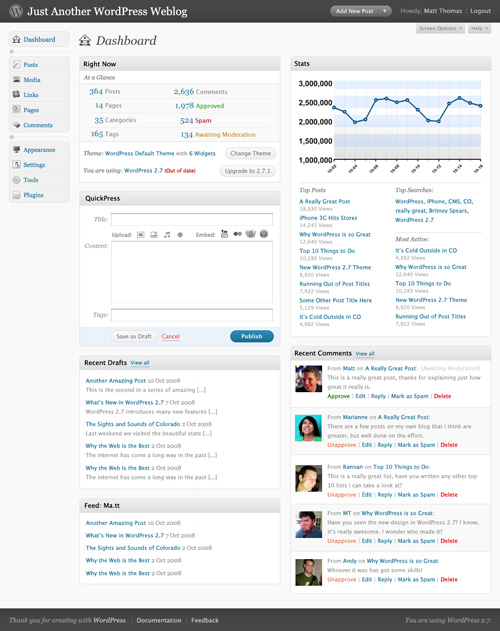
WordPress has morphed from a basic blogging platform into a fully-functioning CMS. WordPress' primary functionality is still blogging, though with plugins it's capable of doing everything from brochure sites to portfolio and gallery sites to fully-featured ecommerce sites. For the most part, WordPress' backend is intuitive to use, with different functions laid out based on different sections of the site (appearance, posts, pages, etc.) The way things work in the backed, though, is very standardized and once you're used to doing things in one section, it's easy enough to figure them out in every other section. Likewise, it's also well organized and finding where to perform different functions is very straight-forward in most cases. The WYSIWYG editor provides all the basic functions you could need, including inserting images, video, and other media, and makes it easy to toggle back and forth between HTML and Visual mode.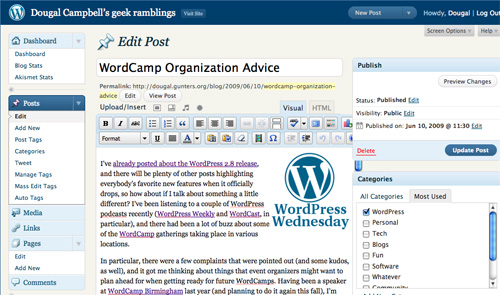
2. Radiant CMS
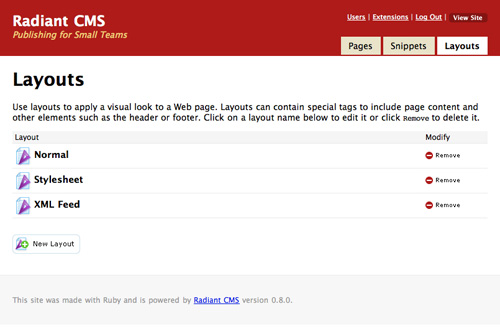
Radiant is built on Ruby on Rails. It's really good at building basic sites with an unlimited number of pages. Blogging and gallery functionality can be added through extensions. The backend is simple and logically laid out, with pages, snippets, and layouts as the primary sections. Functions work pretty much the same no matter which section you're in.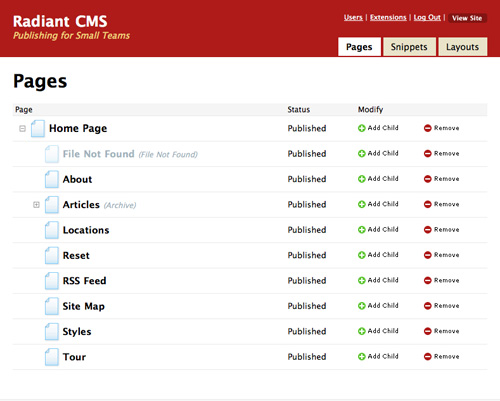
3. SilverStripe
SilverStripe is a full-featured CMS that's capable of just about anything you want it to do. It's built in PHP on the Sapphire framework, making it more customizable. One of SilverStripe's most interesting features is that designers can customize the backend for each of their clients, only showing content fields the clients actually need to access. This makes it potentially one of the easiest-to-use CMSs for geeks and non-geeks alike. And of course it includes a WYSIWYG editor.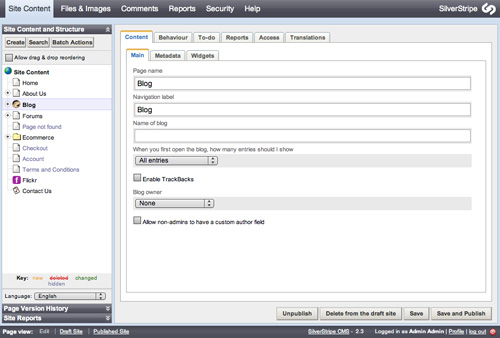
4. Joomla!
Joomla is widely considered to be the most popular open-source CMS currently available. It runs on PHP and MySQL. The backend is relatively simple and straightforward, with sections for managing articles, the front page, menus, media, and other content. There's also a link to create a new article to save time. Drop-down menus also give more options for those and other sections (including extensions). Joomla's WYSIWYG editor includes tons of formatting options—even emoticons.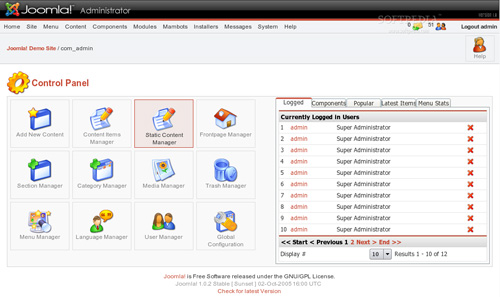
5. TYPOlight
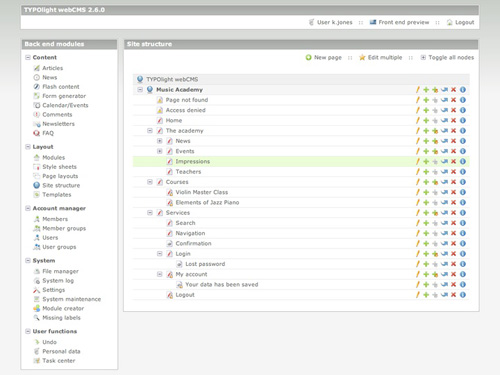
TYPOlight uses PHP5 and Ajax and includes functionality for static pages, blogs, newsletters, and calendars, among other sections. The backend is intuitive while still offering a ton of functionality. There are shortcuts for doing everything from creating forms to including Flash content. Content is displayed within modules, which can be styled with CSS. The output is accessible XHTML Strict. It also offers mootools and GZip support.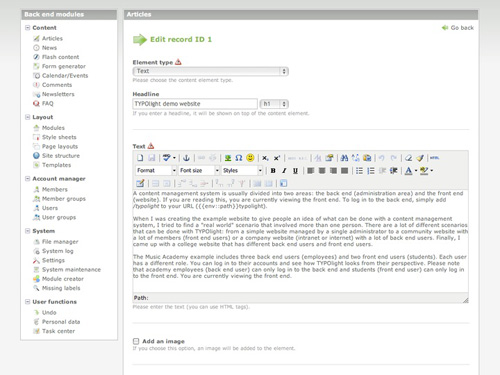
6. Frog
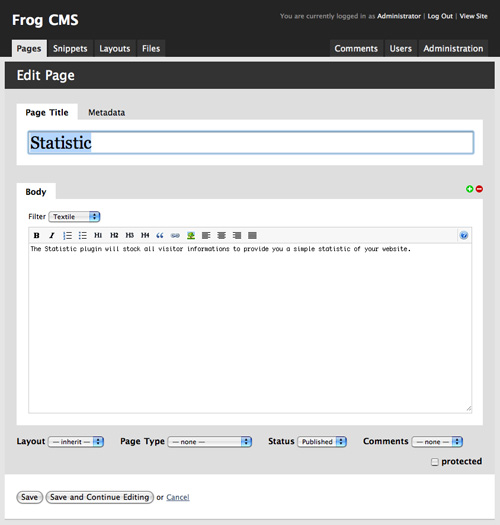
Frog is basically a PHP-based version of Radiant CMS (mentioned above). Frog has a simplified UI that's very intuitive. It allows for an unlimited hierarchy of pages and allows you to customize templates on a per-page basis. It includes the requisite WYSIWYG editor, simplified and more like WP's than some of the more complex editors. It also features reusable snippets for regularly-used bits of content.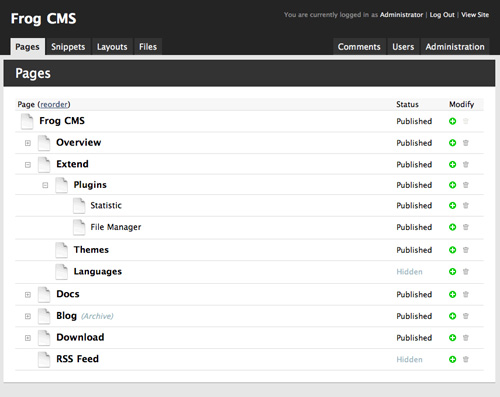
7. Textpattern
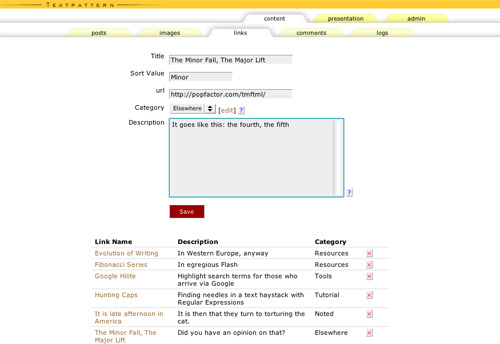
Textpattern uses a tabbed UI on the backend, which is surprisingly intuitive. It automatically brings you to the content editor to add a new page when you login, a great feature for sites that add new content regularly. The biggest drawback to Textpattern is its lack of a WYSIWYG editor. It does use Textile, though, for content editing, which is easy enough for a new user to learn.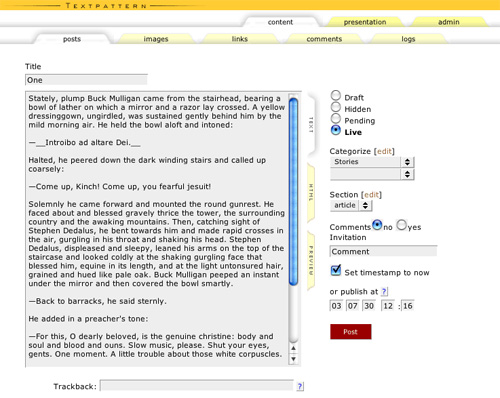
8. ExpressionEngine
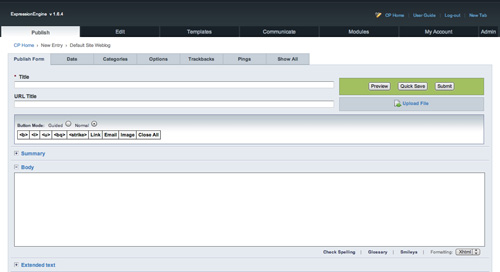
Expression Engine is one of the more powerful CMSs out there. EE has support for just about every function you could ever need or want, either in the core package or through plugins. The backend is very simple and intuitive (the first time I used it I was able to figure out the backend within a couple of minutes). It's probably overkill for very basic websites, but appropriate for pretty much anything else. Modules are available for everything from statistics to user forums. The built-in WYSIWYG editor is pretty standard and works well.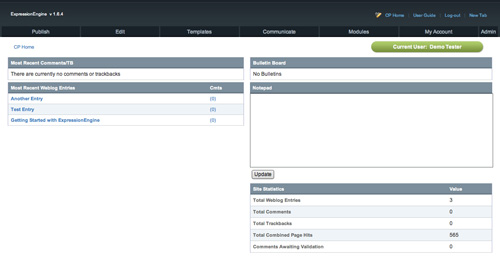
9. Drupal
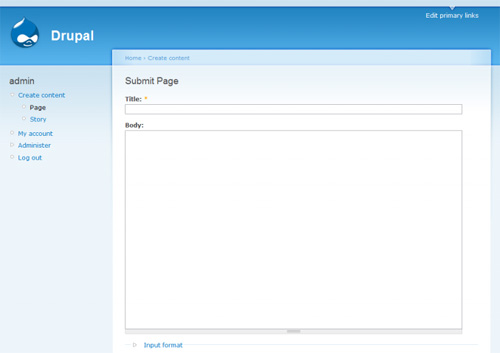
Drupal is another very powerful CMS that can be used for everything from corporate sites to ecommerce sites to social networking sites. The backend of Drupal is incredibly simple, with logically organized links to create new content, manage accounts, and edit existing content. One of Drupal's nicest features is their "Book Page" content type. These pages can be grouped into collections, referred to as books, which are automatically linked together. This is a huge advantage if working with this kind of content. Drupal doesn't have a WYSIWYG editor in the core installation, but there is a module to add the functionality.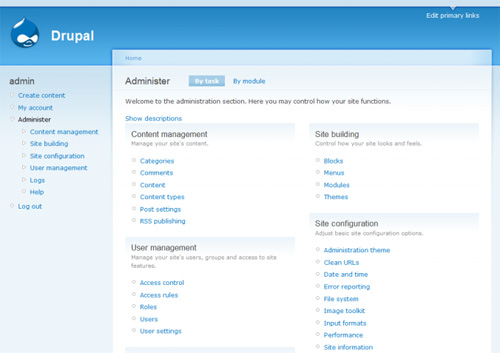
10. CMS Made Simple
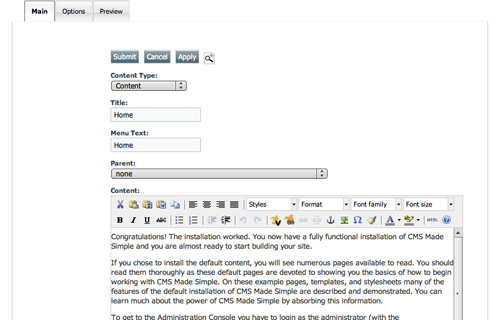
When they say "Made Simple," they really mean it. CMS Made Simple was the first CMS I ever used. I literally set up my first CMS-powered website in the course of a single evening (with a customized but out-of-the-box template). It includes complete template support, an incredibly easy-to-use backend, and an unlimited content hierarchy. There's support for "global content blocks" (called snippets in a lot of other CMSs) and plenty of options for site layout. There's also access to help files right from the backend, including the wiki, IRC and forums. This is another CMS with no built-in WYSIWYG editor, but there is a plugin to add that functionality.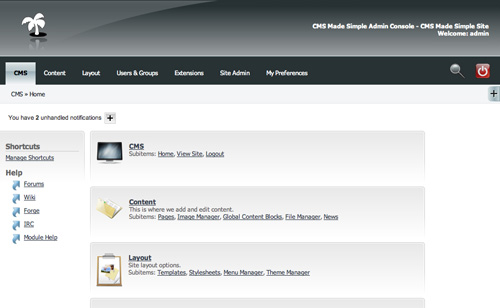
Author: Cameron Chapman
Cameron Chapman is a writer, blogger, copyeditor, and social media addict. She's been designing for more than six years and writing her whole life. If you’d like to connect with her, you can follow her on Twitter or at her Personal Website.Write for Us! We are looking for exciting and creative articles, if you want to contribute, just send us an email.
Excellent article Cameron! Very very insightful and useful. Cheers!
Hi Cameron,
Usefull article for choosing among different CMSs.
Very nice article.
sachin
It is indeed a very nice article and is very detailed.
I vote for WordPress as the best CMS for the common public who want their own website without much strain.
ufff a crazy article!!, simple amazing stuff, information, resources… another great post !!!!!!
Interesting list, but as is typical, I’m saddened to see no mention of .NET anywhere. All of the choices are Ruby and PHP.
Nothing wrong with .NET…its great and in some ways better; but the PHP community is so large and has so much support, its tough to match.
My thoughts exactly. I guess the author might not be familiar with .net technologies though which is fair enough – you wouldn’t catch me blogging about php CMS’s!
DNN is the only practical option I’ve tried so far. It’s streets ahead of most others I’ve used but does have a few minor fallbacks:
1. The skinning guide is poop
2. Performance isn’t great – mainly due to viewstate use I presume.
Drupal has to be my favourite PHP based CMS. Shame there’s nothing similar built in .NET really!
I’m currently dumping a DNN install for Worpress. DNN is just too hard for my users to log in an submit content. And the pool of designers is much smaller.
I would recomment Umbraco. It’s open-source and completely based on the .NET platform. It’s also got a great seperation between design and content. However, it’s documentation is still sketchy, but once you’re past it’s steep but short learning curve, it’s awesomely powerful.
Awesome list, I always stuck to drupal / WP, but your write-up realllllly makes me want to experiment with some of the others. Thanks!
WordPress!!! After I discovered WordPress, I haven’t even played with any of the others.
I have to say that WordPress will always be my #1 choice for blogs and small to medium-sized websites which needs CMS’s. The only reason to really stray from the safety, support, and huge collection of plug-ins with WP would be to use Drupal for a larger-scale site
I have found WordPress plugins to be unreliable versus any Drupal module.
Oh really? Where would I find OFFICIAL WordPress support, from the company that puts out WordPress? What support packages do they offer?
I’ve used 7 of the 10 CMSs listed above, extensively. I’ve found ExpressionEngine to be the absolute best, and that price you pay for it? That includes lifetime support.
And ExpressionEngine has had 2 security patches in the 4 years I’ve been using it, compared to many, many from WordPress.
Joomla and Drupal are also decent – if you want a blog for a personal site, WordPress is great, but I’d never rely on it for business when there are plenty of better alternatives. People hear the WordPress buzzword and assume it’s the best.
“And ExpressionEngine has had 2 security patches in the 4 years I’ve been using it, compared to many, many from WordPress.”
I don’t intend to criticize EE, but in my experience many security patches usually means active development to constantly fix problems and bugs that are found, and promptly push those fixes to the end user. In fact, it would bother me to only see 2 security patches in 4 years — I would wonder if they are on the ball or not.
WordPress serves as the primary CMS for my company and we have never has a security breach.
If you want to compare platforms based on the number of security patches, however, Drupal takes the lead by a decent number, putting a security patch for V6 out almost every week.
Unless you also know how many it has needed and whether they arrived in time to keep the screaming hordes at bay, how many security patches a package has had is a useless metric.
Did they do the job? Did they arrive in time?
For instance, my anti-virus software (Avast) sometimes updates several times a day. These are ALL security patches and I couldn’t be happier to get them.
So far as I can tell, frequent upgrades is likely to be a good thing, showing active development and spirited growth. I do not count frequent upgrades against a product, especially now that WP has learned how to them itself. (It was a huge hassle before … now it’s no hassle at all.)
hi! when you creating a website using wordpress. Is it necessary to make your own plugin or to use other plugin. I know this might be a stupid question but i want to learn more about cms. This is my first time creating a site using wordpress.
Hi Ace, in WordPress you don’t have to create your own plugins. I’ve been using WP for 7/8 years and I’ve only been using plugins created by the community (although I’ve got an idea for a plugin I’m hoping to try and develop in the next few months).
In WordPress (as in many popular CMS) there’s usually more than one option/plugin for anything you need (create forms, user management, SEO, stats, etc.), giving you a lot of options to choose whatever suits your project best.
Hope it helps :)
Any thoughts on magentocommerce.com ?
Magento is not a CMS by the contents of this article. Nor does it fall under any other category of Content Management System of any other article, post, or blog I’ve ever come across.
Magento is an amazingly constructed e-commerce solution.
While you may argue that it DOES manage content, true, but not in the sense that this article relates too.
However, it is extremely powerful. It’s gotten a ton of race positive reviews for its ease of use, feature set, customizability, intuitiveness … the list goes on and one.
Ah, I see your point! It is really an e-commerce solution, not really something you would ever setup for just a blog or website- making it not really a true CMS.
I would love to see an impartial look at Magento by Ms.Chapman, great article!
Thank you for the response too Organized Fellow.
Nice post. I think I’ve tried all those except maybe Frog and Radiant, I always go to back to Drupal and MODx CMS, the best two in my opinion!
I also addicted to MODx as it gives me ability to custom almost everything.
Another huge fan of MODx CMS over here. I’m continually impressed with it.
Yeah.. i agree for MODx… very easy to use. if you are into CSS designer, then MODx is fit for you.
MODx matches all the criteria mentioned above.
It simply rocks.
My thoughts exactly, why modx is never on this kind of lists is beyond me…
Another vote here for the awesome “IT JUST WORKSness of the ModX” – roll your own/buy a template from themeforest – chunk/snippet/ajaxsearch/contactform/blog – job done – go for a beer.
Definitely another fan of MODX. I’m new to CMSes altogether and it did take me a little white to get the hang but after I did… everything started going pretty smoothly.
Another MODx fan/user here!
You’ll never guess, another MODx fan ;)
Mary, it’s thanks to your tutorials I got the hang of it.
If you are interested in MODx, be sure to check Mary’s tutorials on the website. (click on mary’s name, can’t drop the link here…)
An alternative to the approach of getting needed functionality with external modules that may lag behind the development of the core code is to use a CMS that provides more out of the box. This is what TikiWiki does (http://tikiwiki.org). The problem of features you’ll never need is solved by simply not activating them. Tiki’s administration may be more complex than others, but the up side of this is a lot of power and flexibility. Especially recommended for sites that need more than standard CMS features.
Just what I was looking for. Another great CMS is CushyCMS.com it is not as powerful but its great for small sites whose owners want to edit the few pages they have.
Interesting article. Any more CMS applications?
i think that drupal is the best because has great punch of plugins and clear code
You say:
“One of the biggest drawbacks of Joomla, though, is it’s use of tables for layout.”
That was true for Joomla 1.0, but is wrong for Joomla! 1.5 which is the current version. Joomla 1.5 uses a div layout
No, it doesn’t. The default templates that come with Joomla might use div layouts, but articles themselves use tables for layout. This will be fixed for Joomla 1.6, whenever that’s finally released.
@Cameron: your screenshot of Joomla is very out-of-date, that’s Joomla 1.0 but the latest version is 1.5.
Oh… forgot to say you can override the table layouts for articles and other components, just search for “joomla content overrides” and you should find something.
Yeah just adapt the ‘beez’ template overrides and you can easily have a tableless Joomla! site
i do not agree with joomla being an intuitive piece of software.
I completely agree with this statement.
Out of the box some of these CMSs may be better than Drupal, however Drupal doesnt boast itself as a CMS it is a Framework, and a bloody good one.
I also do not see joomla as an option
Though I have kept up Drupal sites, eventually they all are rewoked as Joomla! Nothing else I’ve found – and I’ve tested most mentioned in both article and comments – has the number of available extensions and available third party templates, to render a strong and professional looking site.
Jeez, that was a clumsy post – I meant to say of many sites built using different systems, except for a couple of Drupal sites, all the others were eventually converted to Joomla.
Joomla is rubbish. It is for those who are complete novices to web designing. It is not intuitive at all.
Modx or Drupal are much better replacements for Joomla.
^ im with him
wow, this really great article, this should be the ten commandments for web designer.
This comes in handy while I was writing a similar topic. Your posts have always been very good..
CMSMS comes with a WYSIWYG-editor pre-installed (Tiny is used)
@nourayehia
You mention, ‘Some of the plugins available (or at least some of those used on sites powered by EE) either stick the JavaScript in the header of the page or, worse, right in the middle of the page’s code.’
I mean no disrespect, as I love visiting your site frequently throughout the week.
I am an avid ExpressionEngine user. I’ve not come across any plugins that do what you mention.
If some code is inserted in the middle of a page’s code, that is most likely the intent, or the result of the Developer.
ExpressionEngine templates do NOT output anything that you don’t want. If the site does not validate it’s because the Developer didn’t code it right.
It doesn’t output anything you don’t want it to.
Or at least I’ve never come across that?!
:(
Anyhoo. Great round-up of Content Management Systems.
I’ve used about half on that list. I’d like to try Frog next :)
I really miss TYPO3 in here. It can do anything all these others can and more.
I would like to say the same.
TYPO3 is the most powerful system.
Not that easy but very flexible.
When ist come to real business ..
there is no really choice beside TYPO3.
Another vote for Typo3 :-)
Me too….
Allthough TYPO3 seems to be not as popular in the states as it is in europe… that might be the reason.
I’ve been using Typo3 for around 5 years now, and yes, it’s got a learning curve but it’s easily the most functional of the CMSs I’ve seen. Many large enterprises are using it now, including Peugeot, Citroen and Renault (for their intranets)
I disagree. Piss poor documentation, especically when it comes to 3rd party extensions. Largest learning curve of any CMS I’ve used. It does NOT allow creative freedom (it injects it’s own header code and other stuff all over the place unless you know how to turn it off). It’s admin area is the least intuitive of any CMS I’ve used. Drupal is more intuitive. I believe the only people still using TYPO3 are the ones who don’t know any better and haven’t taken the time to learn anything else.
I really believe modX should be on this list.
Great article. I currently use WP for autonomyseries.com and my personal website, however, several years ago I used drupal and found it excellent even back then. After reading this article I’m going to give drupal another look (it’s obviously progressed massively since I last used it).
As for the .NET shills … please. I would never consider deploying any even remotely important site on a Microsoft platform. Most of us in the financial industry learned long ago how unreliable .net and Microsoft platforms are…even the London stock exchanged dumped the platform after a daylong (!!!) outage when no one could trade, despite having a well-known (and long criticized) “strategic relationship” with the purveyors of .NET. Drupal, WP, and most of the CMSes reviewed here can run on any platform, thankfully allowing those of us who do concern ourselves with stability, performance, and security, the option of running our sites on sensible and reliable platforms, and not being locked into the one vendor with the industry’s worst record for security bar none.
This is a typically naieve OS fanboy response. There are places you can go to argue the toss about which technology you prefer to use. It really comes down to personal preference though imo.
Regarding tfa, nice set of guidelines and a good list of options. It’s impossible to choose a catch-all CMS but I find that having good working knowledge of several platforms allows one to make a decision based upon the requirements and priorities of any specific project.
Some time ago i tried drupal for my sites. I just simply cant think of any other cms/framework right now. Posibilities are limitless, community is huge and very helpful, Drupal itself is very intuitive and easy. I used to it so much, that recently im using it over wordprees for my blog. I dont care i had much more time to spent for establishment of site, who knows one day i may run shop there or whatever.
great post by the way
cheers
May I add another category?
Desktop CMS.
I am aware of at least three different ones (among one of it I work for the vendor):
– City Desk
– Zeta Producer Desktop
– Web2date
Depending on your scenario, your budget and your technical skills a Desktop CMS is a quite good choice.
You should also take a look at Bildy CMS at thebildy.com
Cool article! I use Blogger and WordPress, and only discovered other fantastic CMS after reading your post.
You’re right, WordPress is good with its simplicity and plugin.
Drupal, when I met in the first place, seemed to be the perfect CMS to suit all my needs, not only for its extendible architecture, but also for its SEO-savvy structure, however, forcing all 3rd party developers to re-write the add-ons for each new major version which was always backwards-incompatible messed things up every time.
Not to mention every upgrade ruining my drupal-sites – always having to restore backups.
Drupal users shall endure the bugs!
I would hardly consider EE expensive. The support is well worth it. Most times I’ve had an answer to my question in 15 minutes or less. With wordpress I never had any questions get answered – they just sat there in limbo until I finally gave up.
Support makes EE worth every penny. That and the unbridled flexibility and power that it provides.
I use joomla a lot beacuase it’s a powerfull CMS, i don’t agree with you when you said that joomla use tables for layout, the new versions since 1 year ago are completely tabless.
I also like modX cms, but it lacks in poor documentation.
The moment you put WordPress on as a CMS, you lose all credibility. You miss some of the most important features that a CMS should have: including complex workflows that can be customized, content indexing(especially of docs like word and excel), scaling, multiple site deployments, intranet support, authentication integration, security, etc.
All the software you specified are pretty much simple dumbed down apps that can not even compare to what is needed by a REAL CMS. Maybe you should change the title of your article to 10 best blogging software.
Your assessment is very naive and short sighted. And the fact that you’re pretty much stuck with php technologies says a lot too.
I think anyone who has worked with CMS realizes that what you said is just as bad as what you accuse the author of.
CMS means different things to different people. This article is actually about CMS focused on web publishing, which is what most designers think when you say CMS. The features you describe seem to indicate the portal or “enterprise” style CMS, not one focused on web publishing.
That said, most people I’ve worked with (even big companies) find they don’t want all that extra red tape in the end. Punishing your users is not a desirable feature.
Also Frank, you’re a douche.
Tensai, thanks for a good laugh. Yet another case of the internet being a very, very serious place. Just try to keep in friendly and productive people!!!
Sean is right – enterprise, portal, DAM type CMS is NOT the only type of CMS.
and Tensai is right too. Frank you’re a douche.
By far the funniest comment thread. Tensai and Lorenzo are right though. Frank, you kinda leave the impression of wanting to boast a more impressive level of engineering sites than the rest of us mortals.
I’d also recommend concrete5 (http://www.concrete5.org)
It’s very intuitive, and very complete!
Seconded! The list of 10 was no different than any other list of 10, I was hoping to see Concrete5 on there cause its the sheeeeeeeeiiiiit.
Excellent post. It is so convenient to have this information in one place. I was not familiar with several of these CMS. Thanks for taking the time to do this.
thanks for the quick reviews. i find i have 2 types of clients: ones that need the bells and whistles (where i suggest wordpress) and ones that need basic, simple text changes (where i suggest cushycms). i just wish there could be something as simple as cushycms but with the features of wordpress… thats probably to much to ask ;)
No .NET Nuke?
Surprise no one responded to this.
No love for Microsoft here? Many companies out there still on .NET platform. I have tried .NET nuke, drupal, wordpress and Joomla!. Have to say that Asthetically, I’ll go with wordpress but I’ll stick to Joomla based on my needs. My pro Microsoft ITD dept on the other hand would love .NET Nuke.
Thank you i was looking for.
Good article!
Nice round up of CMS, but feel that MODx should have featured in the list too.
I’d second that, we’ve been using MODx for years and it ticks all the right boxes. It’s a dream to develop for, it’s incredibly flexible, and our clients love it. :-)
Good article, however, would you happen to have any ASP/ASP.net suggestions for CMS’s?
Please suggest which is easiest one to change entire website design layout for small websites
I really think you are missing the .NET Open Source CMS – Umbraco (www.umbraco.org). Earlier this year the version 4 was released. And it is rocking !!
I’ve heard of it, would’ve been neat to see it here.
All peoples already know about joomla, Drupal or WordPress…
I’ve been working a lot with Umbraco lately and I have to agree with Mikkel the latest version is a great Open Source .NET solution.
+1 for Umbraco. It can do anything you (webmaster / developer) want including full control over the output, and the users (content editors) love it too. Not everyone’s heard of it, but every .net web developer should take a look.
Please add MODx to your list.
Great list, but it’s a shame that there is no mention of MODx.
This CMS is clearly underestimated.
I’ve been building Drupal sites for a couple of years now and haven’t really taken my head out of the sand to check out anything else aside from Joomla!… which was not a pleasant experience.
Do any of these CMS’s have anything similar to Drupal’s CCK- a way to create custom content types, or pages with specific fields that you’ve chosen?
Nice article.
MODx has template variables that you can use in pretty much the same way. I’m a fan of both!
There’s one additional thing that made me Textpattern addict which you didn’t mention. Its fantastically flexible templating system reqires absolutely no PHP knowledge and enables me to build pretty complex structures right out of the box.
Modx definetly belongs on thisw list!
Great post!
You should also mention DotNetNuke in the list. It´s open source CMS as well.
I’m afraid I agree with Frank. I once tried to use WP as a cms and it soon became apparent, it’s far from it. I mean, the need to write so much bespoke coding (or adopt a 3rd party plugin) just to be able to use more than one template throws it way out of the CMS category for me.
Joomla, is far from intuitive. Just horrible.
Along with an experienced EE developer I recently used EE for a large job. Very, very flexible, I can see the potential BUT I was surprised to find it fell way short when it came to some relatively simple tasks such as managing media and allowing the client to easily create a new page and choose a parent link.
I’ve gone full circle. I’m no programmer. Photoshop/html/css kinda guy. In the early days I did some sites using CMS Made Simple and am yet to find anything that feels just… right. It’s really intuitive, great support, much nicer looking admin to hand to client now. A few too many updates for my liking but thats the price you pay for paying… nothing.
Would second this, started using CMSMS then tried a few others and came back to CMSMS….I’m far more of a designer than a developer and it suits me down to the ground.
My workflow is:
1. Design in Photoshop
2. Convert to HTML/CSS by hand in Dreamweaver
3. Take HTML/CSS and create template in CMSMS (for a standard enough home page this takes 30 mins for me, I like that)
I work with Joomla! for several years now, after testing a couple of other CMS. What I like about it is that I can use template overrides to alter the output of the extensions to my own needs.
The templates installed with a default Joomla! installation provide me a complete table-less website.
Add-ons can upgrade functionality to a higher level.
Besides… it’s easy to learn others how to use Joomla! Improvements have been made to improve the usability. Which is good.
It would be interesting to read a post looking at CMS for mid-market/enterprise solutions, this would introduce a whole new range of criteria. Can I get support? Is it scalable? How easy is to find developers? This would also bring a few alternative platform options into the mix like .NET etc (e.g. Sitecore / Escenic)
I have used a few on this list but right now I’m a big proponent of MODx. It is very clean and extremely flexible. I love the fact that I can create a design and not have to use all kinds of workarounds to make it work with the platform. Although it has some great plugins (Ditto, Wayfinder for example), it does not have a go to eCommerce plugin like Joomla does with VirtueMart. I have full confidence that someone will create an eCommerce plugin soon and then there will be no other CMS I would use.
Have you looked at integrating MODx with Foxycart? Seems very easy and straightforward to do! :)
Concrete5 is the best CMS I have used (http://www.concrete5.org). Very intuitive, yet also very customizable. Also very easy for non-techie people to pick up on.
I’d also have to vote for C5 – its one of the simplest to set up, and has one of the most intuitive edit methods for people to use to make changes! A great tool!
Nice article….very informative…Thanks…
I agree Expression Engine is a very powerful CMS, but I find the interface isn’t too great for non-techy users.
Unless I’m missing something, there is no built-in WYSIWYG editor, what you get are buttons that insert HTML tags into the text – not exactly WYSIWYG. There is an EE plugin for tinyMCE which does the job, but requires installing and configuring.
Similarly, the simple task of adding images and documents isn’t handled well. Too fiddly for non-techies. The ‘File’ extension helps with this – again another install and configure.
If your users are very technophobic you don’t have to let them anywhere near the backend in ExpressionEngine. Build stand alone entry forms for content creation. It’s in fact one of the reasons why EE is so powerful – you can completely ditch the backend control panel if you want to.
I also don’t get the original author’s point about javascript being inserted midway or code being bad with EE. It’s template driven so it’s up to you where code is placed.
I’m soo curious about concrete5 (http://www.concrete5.org) I wanna try it this week, I hope you can write a review about this new CMS ;)
This is a typical article written by someone who doesn’t know what CMS is. The tip-off? The first “CMS” mentioned is WordPress. Real CMS systems need features like workflow, versioning, scheduling, and so on. Blogging tools are not CMS, and most CMS systems have not a lot to do with rendering.
If what you need is actually CMS, go take a look at Documentum, Hippo, Bluenog, and their competitors.
As a nonprofit end user of CMS’s, I disagree. A CMS is simply a server-side software package that drives a Web site and allows non-technical users to update content through their browser. Workflows, versioning, scheduling are all very nice and essential for enterprise CMS’s with many authors and reviewers. But not every site needs an enterprise CMS. We run our main sites with an enterprise CMS but use WordPress to build small one-off sites that will have only 1 or 2 content managers. For an issue campaign Web site we might only need 5 or 6 pages, but the content might need to be updated regularly by a non-technical employee. An enterprise CMS is total overkill for that, but WordPress is perfect.
drupal maybe one of the nicest plattform for cms type
I would add Habari to the list and drop Joomla
Thnx for this. Looking into switching my static website into Textpattern. Just order the book, actually. Thnx again.
Yeah Joomla is great. It can pretty much do everything you want and if it can’t someone has made a plug in that can.
I’d say that it feels diffcult at first (not that intuitive to begin with) but if you get a good book and put in the hours you will get amazing results.
By default it does use some tables in layout but they provide a template with overrides as part of the package and it’s really simple to adapt them for your own template. (The template is called ‘Beez’)
WordPress is no CMS. Or rather it’s a CMS for hobbyists, not for genuine developers.
I’d be interested in trying a CMS with a more advanced Access Control system though. Anyone got any suggestions?
I just love WP and uses it for different site’s. It’s great to start and use as CMS with allot of plugins.
I worked a little with Joomla but i find the userend a little bit complex.
But anyway great article!
I echo Frank’s comments above. Your list of ‘CMS’ solutions is more geared towards small sites or sites with limited requirements for multi-site deployments and extensive workflows.
I have several personal sites built on Joomla and other low-level CMS frameworks. Each of them is more problematic from an upgrade and maintenance perspective than any of the .Net based solutions that my company builds for our clients.
These solutions are based on Ektron, Sitecore and Kentico mostly. All of which are full featured, include professional levels of support as part of their costing and detailed workflow and very granular permissions.
As a development house we evaluate most available solutions to ensure that we are always proposing the best solutions for our clients.
Opensource based solutions would make us the most money because of the constant support and regular code maintenance that is required to keep a site stable, error free and secure.
Not sure where people’s experience has stemmed from but from looking at most of the comments I’d say that the majority have not had any professional development experience with mid-tier or higher enterprise class CMS systems because there is very little apple to apple comparison here.
It seems that every piece of software that allows you to change content through a WYSIWYG editor is now deemed a CMS. Word can publish HTML pages as well better add that to version 2 of this list. (tongue firmly in cheek)
Just my $.02
K
What about magnolia?
I echo Frank’s comments above. Your list of ‘CMS’ solutions is more geared towards small sites or sites with limited requirements for multiple deployments or extensive workflows.
I have several personal sites that I built on Joomla or with other low-level CMSs. Each of them is more problematic from an upgrade and maintenance perspective than any of the .Net based solutions that my company builds for our clients.
E-Cubed’s solutions are based on Ektron, Sitecore and Kentico mostly. All of which are full featured, include professional levels of support as part of their licensing and have detailed workflows and very granular permissions.
As a development house we evaluate lots of available CMS solutions to ensure that we are always proposing the best options for our clients.
Opensource CMS solutions would make us more money because of the constant support and regular code maintenance that is required to keep a site stable, error free and secure.
Not sure where people’s experience has stemmed from but from looking at most of the comments I’d say that the majority have not had any professional development experience with mid-tier or higher enterprise class CMS systems because there is very little apple to apple comparison here.
It seems that every piece of software that allows you to change content through a WYSIWYG editor is now deemed a CMS. Word can publish HTML pages as well. Better add that to V2 of this list. (tongue firmly in cheek)
Just my $.02
K
I recently stumbled across cms.txt and it looks like it would be fun to play with. Anybody have any experience with it?
Something about MODx keeps bringing me back to it. I would love to hear how @Cameron would compare it with the others in the list. It took me a couple of times to get used to it (I was thinking too hard). To me, other CMSes are like modular houses partially built, when MODx is like getting the raw materials to build any house you want.
What is everyone’s thoughts about building custom CMS’s on a job by job basis?
Basically I build only what I need for most of the jobs I do. Some of them have been for some pretty high profile clients too! I feel its easier to build what you need and keep it basic (with LOTS of error handling) then to take a platform like drupal or joomla and remove what you don’t need so that the client dosn’t screw it all up.
any thoughts? should I invest some time into taking an already built CMS and just strip it down and start using it?
From a client’s perspective, custom CMS development has two problems. One, is that it locks me to you as a vendor. A standard CMS that you configure, however, will allow me to switch vendors in the future without having to rebuild the site from scratch. (What if you decide to change careers or you go out of business?)
The second is that it is less flexible because you are coding to a set of requirements that is guaranteed to change in the future (because Web sites are projects that never conclude). With a custom coded solution, reconfigurations will require re-programming, which takes time and presents many opportunities for new bugs. Whereas for popular CMS’s you can often reconfigure with settings and/or plugins that have already been tested–or they provide a standardized API to program against.
I think your first poitn is somethign of a myth, okay if someone writes everythnig from scratch in say PHP, then yes you probably would have to rebuild from scratch, but that is a bit out-of-date. Most develoeprs use a framework these days, so if someone uses say Ruby On Rails, it will be written using a framework other develoeprs are perfectly familar with, using MVC and no doubt using plugins others are perfectly familar with. So the client is really only locked into RoR, which is any differnet than being locked into Joomla or Drupal.
And as for being less flexible, that is simply hilarious, a CMS is inherently less flexible than a framework.
Clients may also wish to consider performance, pre-built CMS simply don’t compare.
I’m not sure if i can clear drupal as the best cms in my mind :)
Excellent article. Well researched and written. Now there are enough systems out there that, in the future, lists like these can be more specific. Instead of a general list of “top CMS,” lists should now focus on a category, like the best for personal sites, the best for small businesses, medium-sized businesses, corporate sites, etc.
and what about SPIP ?
SPIP
Good post. Frog CMS and WordPress is my fav. Thx
MojoPortal is excellent! (www.mojoportal.com)
Sadly, no CMS will meet all of those requirements. Most of the ones listed don’t even come close.
I would suggest looking at Symphony CMS (http://symphony-cms.com/). It meets every one of the 10 items listed except for part of #10. The user community is fantastic but the documentation is not yet finished. Since it uses XSLT as the templating language, which is a Web standard, there is already a lot of resources for that available.
Requiring wysiswg and design control from a cms may not be in your best interest. What matters is to keep consistency and to focus on content (content is king).
If the website is well designed and developed, style sheets take care of the styling, and users just have to focus on content.
Once you start giving layout control to the user, consistency and design quality goes down the drain. To make a parallel, compare the eye-cancer inducing flashing blinking myspace pages that can crash yout computer to the clean, uniform design of facebook profiles.
wysiwyg seems cool and makes clients happy, but more often than not it gives them control on stuff they shouldn’t even have to worry about.
to sum up: use a cms for content management and leave design to designers.
WYSIWYG editors are not always a great advantage. I find that most of the time, they simply make ‘non-geeky’ clients stuff up otherwise clean code and I tend to disable them. If you’ve done a good job setting the site up, then the client should not have to worry about a WYSIWYG editor.
I try a lot of CMS, the best is Cocnrete5 (www.concrete5.org).
Must grow a little more, but is the CMS revolution.
Have you seen SiteCake (sitecake.com)?
Great ARTICLE!
Aloha from Eddie MERC from Hawai’i, USA
wow. amazing list. very useful.
thanks
Firstly thank you for the interesting read, I have spent many hours recently researching various CMS’s and learning peoples views to see what features they find key to a CMS.
It’s good to see a nice selection of CMS’s being discussed in a sensible fashion and not just a “what does the most”.
Keep up the good work.
Great list, but why is MODx not on it?
I agree with Greg, while WordPress is a hell of a free CMS option, it’s not for the true developer type. I admit we use it to run a handful of our sites but recently was hacked. Original code CMS systems won’t have this problem. If you’re running anything mission critical, develop your own.
Great post! I Tweeted it to my followers, Dugg it for the crew and Stumbled all over it.
RobertO
Graphic Design Schools.org
I really like WordPress – it’s very easy to use. I’ve also used Joomla on a few sites. My first choice is WP.
SilverStripe seems to be gaining popularity. I’m currently using SilverStripe for simple CMS sites, EE for more functional sites that use both individual pages, forums, blogs etc & WP for blogs only. I hear Drupal is probably the most powerful CMS tool out there, would others agree!?
This is a really smashing! Nice Article.
I prefer Joomla and WordPress as my website platform. They are great in SEO.
Thanks for the tips!!
I use Article Manager from Interactivetools.com. They have a lighter weight version called CMS Builder but I need the functionality of Article Manager…
I think SquareSpace covers everything single one of those and even goes beyond the way we think of a CMS. Why should the backend of a website not look like your website? Why not click in a text area and just edit it?
I use wordpress on my site. But I hate having to go to the backend, update a page or post, then have to flip back to see what the finally results really look like.
SquareSpace really dominates all of these except it’s not free. The best stuff is never free.
If you like SquareSpace, try Concrete5.
WordPress beats every other CMSs, it’s the most flexible CMS I’ve ever used.
Excellent article! I am currently evaluating different CMS solutions for a client. I have used a few for other projects and really liked TextPattern. Right now I am heavily leaning towards MODx. I asked a newbie question on their forum, on a Sunday, and received several replies back (and one from the lead developer). So that passes the test for me on the community. How many other times have posts gone read but unanswered for a simple question?
One requirement that I have for a CMS is a core user registration functionality. I have seen this called ACL or Membership. Basically, I need the ability to have different users to the site have access to different content based on their registration levels. I need to be able to define custom user groups and have pages/content on the site placed into the different levels. Having the navigation change automatically to show the available content for the user once they log in.
And realistically, any CMS that you need to add multiple 3rd party plug-ins to add required client functionality will be a problem for my clients. The last thing I need is to update the CMS and have the add-ons break, or not be updated at the same time.
Simpler is better in my book.
I will check out some of the products listed here. Already going to look at Concrete5 and Frog in addition to Silverstripe and Radiant.
Im suprised at the exposure Frog is getting. I use it and love its simplicity :) Thanks for noticing them out there I know they are a bit less known.
You article is missing the definition of a CMS. I Never knew that WordPress was a CMS : it’s just a blog platform. Most of the tools presented here are not CMS. What about “Typo3” or “EZ Publish” ?
Thank you, I was going to say the same thing.
WP? Blogging Platform. It’s not a CMS, although it is *CMS-like.*
I’d suggest CushyCMS, I’ve heard good things, but no direct exposure to it myself.
But this is VERY generic – you could run with “ten blogging platforms” “ten bulletin boards” “ten community sites” “ten self hosted social media solutions” and some of the recommended platforms could cross over, and some wouldn’t.
What simple CMS could you advise?
For average end user, without php knowledge, hobby website. Something that allows add articles without manually linking them to other pages, and spam-protected submit form. WordPress – no matter is it CMS or not – should do the job, but it is too much blog-comment oriented to my liking.
Great discussion! I would really appreciate if you add a couple of suggestions for us, basic users. Cheers!
I like wordpress as CMS.
WordPress is definitively NOT a CMS
Very good list. I can confidently say our company didn’t even come close to following a single one of them. Not one. I was expecting maybe 3-4 but nope, they have demonstrated the incredible ability of picking the worst system probably out there.
Manila from Userland is all that and a bag of chips, try it. :-) They were doing CMS before so many of the others. My clients tell me, “wow, I never knew this could be so easy, yet powerful.”
* Shameless plug warning *
Me and a good friend of mine have just launched a product called SimpleCMS.com which enables designers to add simple comment tags to their pages – then their clients can edit their sites from a page that looks just like their site.
It’s very easy to use for both designer and client and is completely brandable too… oh yeh, and free :-)
I’m not sure why Joomla! made this list of “excellent CMS options. It is an option, but not excellent by any sense of the word.
Perfect! I am just going through testing CMS applications and this has really help weed out some that would have wasted my time.
Thanks
Steve
I guess this one fits all the rules http://agilecms.net
Simple, intuitive and has all you need for small and medium business website.
Hi Cameron, that’s a very good and helpful summary. I just want to point out that Silverlight is extremely helpful in development because it’s set up entirely in PHP/OOP.
I miss the Website Baker. For small sites, very good.
And Moodle for educative content.
MODx should be in that list.
Yes its true and i am also agree with this statement and
and also thanks for such a nice article.
Great points. I especially like the bit about choosing a CMS that does what you need it to do.
I think my biggest point of frustration with so many of the open source cms systems, is having to learn a new template language, and the difficulty of setting them up. It’s pretty easy to burn a whole day or two just setting it up and getting the stock templates running.
*shameless plug alert*
We designed our CMS with these frustrations in mind. There really is no installation, the content areas plug into your pages like widgets, and it’s super easy to manage content across multiple sites.
We’d love it if some of you checked it out.
Thanks Cameron for this nice list of content management systems! The RadianCMS backend looks like that on FrogCMS.
No, the other way round! Frog CMS looks like Radiant.
Frog CMS was designed to be a PHP version of Radiant. Ruby on Rails is the main advantage of Radiant but unfortunately it’s rarely supported by common webhosters.
While I have much respect for Drupal’s framework and quality of code, it has an extremely poorly designed user interface. Way to many clicks to accomplish simple tasks like posting articles, etc. Yes, the admin interface could be customized, but thats very time consuming and of course can cause major problems when doing upgrades. Ive been a cms dev for 8 years now and drupal was quite disappointing the few times i have tried it (as recent as this past winter). Joomla is just pure junk and I honestly have to laugh when I hear about people using it. Its basically the new phpnuke.
There’s another big option: wikis. Projects like MediaWiki and Dokuwiki have become very powerful. A lot of sites out there are just wikis in disguise.
I just wanted to give TypoLight some love, since it hasn’t been mentioned in the comments yet. As a purely front-end developer, I actually found it quite easy and intuitive to get into. I am still amazed at how it is able to balance being a CMS that’s set up the way I think, and yet is still very simple for a client to use. Moreover, the amount of available addons are perfect — every one is potentially useful and well-made. Contrast this with trying to browse plugins for, say, Drupal, and having to sift through tons of garbage to find the few good ones.
I personally don’t use any CMS since my site is for my spare time but I do use custom PHP functions, core css file, and MooTools for an easier experience when building new pages.
I however use WordPress for my blog, and am thinking of using some sort of CMS for my labs/developer section I’m working on.
The ability to customize anything and use your own template is a big one for me though, if a CMS can’t offer you that then it’s usually worthless. Also I’m ashamed that Joomla uses tables.
There are actually two options available for e-commerce plugins in CMS Made Simple. Each option has a main module with a subset of child modules that allows you to build the system you need. The first Parent module is Shop Made Simple. While I am not familiar with that option I am familiar with the second which is based off of the “Products” module. It allows other modules to be integrated in with Products that allows for a single Cart or Multiple Baskets, Order Processing, 2 tax modules, a few shipping modules and a handful of Payment Gateways. You can make it as simple as you want (i.e. Inventory listing only – Car Dealership) or as complex as you want. A full fledged e-commerce solution with the power of a great CMS behind it.
Where’s the modx? It might take a little more set-up and learn time, but every layout is 100% customisable, and the functionality you can create is limitless in comparison
Excellend article. I love wordpress though…
I have yet to use another system that is as robust, flexible and functionally-sound as Silverstripe. I’ve used all but three of these CMSs listed in this article, including a number of the ones listed in comments, and nothing beats Silverstripe.
For a quick, simple and easy CMS implementation I’d also recommend JAWS.
WordPress is the best…but i think drupal is also getting popular now a days
Thanks for the great, at-length post…you must have really been around the block with CMS packages! Though I confess I can’t see myself abandoning WordPress any time soon, it’s good to read about the alternatives.
I recently discovered perch (http://grabaperch.com/): it doesn’t have all the features of a larger cms, but it’s great to update the contents of a website.
I’m create sites with ModX CMS.
This system is really flexible and even has its drawbacks
What are the drawbacks to MODx?
Drawbacks: You should have some knowledge of html and css.
Drawbacks: You need to know how to use their system, a.k.a. snippets, chunks, and creating your own plugins in php if they’re not yet available in the community. The GUI and who setup isn’t exactly as user friendly as wordpress either. This means you will definitely have to look at the manual more the a few times.
If the site is for photographer’s portfolio, where users need to upload many photos into the photo gallery, what is my best option? any suggestion please?
For the last millennium or so (ok, for the last 9 years), I’ve used Gallery by Menalto and it is excellent for managing large numbers of photos. There are many themes available and you can restrict albums by username/passwords. There are also plugins to allow printing on certain services (say one you have an affiliate id with), or you can watermark images on the fly.
It offers a lot of different ways of uploading — you can upload through a web form, a java web application, a java desktop app, or an integration with Windows printing/publishing wizard.
It also integrates with a lot of CMS’s (like MODx) and blogging platforms (like WordPress). Gallery itself can be integrated into just about anything with a bit of coding.
The one feature I wish it had that sites like Flickr and Facebook have is user-based tagging. I’m talking about where people can click on an area of the photograph and tag it. Then if a visitor runs their mouse over the tag, it highlights the tagged area of the image. This may not be important for a photographer’s portfolio though.
The link on my name is an example of my site.
I started with WordPress and for simple blogger and users it’s by far the best and the most stable one. I ended up migrating to for more functionality, usability and control. The fact that Drupal out of the box has CLEAN URLs in its core system is a big winner for me as a SEO friendly.
The best discussion on CMS I found on the net after a day on the subject. Thank you.
However, I still cannot make my mind about which one to choose for the websites I am going to develop.
WordPress for the simple ones; EE, Drupa or Joomla for complex ones (a lot of them!); But for medium size and complexity ones??? I’ll have first a look at MODx which seem to have many fans.
nice punch of stuff
Shouldn’t MODx be on the list?
Hey. I recently started using ocPortal, as it’s a great CMS, and many people have never heard of it, unfortunately. It’s definitely right up there with Drupal or WordPress, and maybe even better IMO. It has a huge amount of customization, and is very easy to use. The downside is that not a whole lot of plugins or themes are developed for it, since not many people know about it. But right out-of-the-box, it has a large amount of features, so many plugins that would be a necessity for other CMS’s aren’t needed for OCP.
hey i was trying to get into drupal. I learnt quite a bit and had MANY sleepless nights learning it. But my main concern is that DRUPAL is number 9 on your list. Y is this so?
I thought drupal was the most powerful CMS and many sites say DRUPAL is better than JOOMLA as well.
Please shed some light. Obviously you say WordPress is the way to go.
Your Rule #1 is the most important (and appropriately at the #1 spot!). I would go further and say that aside from defining the primary purpose, but defining in some detail what your primary use cases would be helpful when doing a complex site. Complex sites may require a CMS outside those that you list as examples here.
Good common sense overview. Thanks. Why isn’t Modx on the list?
CMS are the new OS. Everyone has their favorites and will defend them to the end. Personally, I have tried most on the list, and with most you can tell that they are made by developers.
By that, I mean that they all try to install their own lingo, typical universal terms are flipped on their collective heads, and the designing of them is extremely difficult unless you know PHP.
The one I have yet to try, yet am extremely intrigued by because it is always left off the list, yet people clamor for it to be mentioned is MODx. I just can’t tell how well the extensions work because of the unintelligent UI on it’s home site (although it is better than most CMS homes out there).
I wonder why Drupal is so low on the list. I always hear about people saying you have to go in and get your hands dirty with code, but nothing could be further fromm the truth. I work with Drupal every day, and any time I need to make any necessary changes, there is always some documentation somewhere, especially on Drupal.org to walk me through the process.
Well… we use a proprietary CMS called SpiritWeb that is pretty much completely unknown to the world at large. http://www.spiritwebsolutions.com As far as I can tell it scores pretty high compared to all the above alternatives. Also – please correct me if Im wrong – I think ours is the only system that has built in ‘granular security’ where every single file or folder has its own access settings. Its written in asp and has a lot of other security features. For business purposes I would think that the list above should have included security issues. I guess we are not in the blogging class of CMS and more in the enterprise class… but even so…
Also I disagree with point 5… so long as they don’t get in the way why not have the extra features available if you need them? For instance SpiritWeb CMS includes full extranet functionality and full integrated ecommerce – not everyone will use them – but once you have them you will often find uses for them. Its a bit like saying if you only intend to use your computer for web browsing then you only need windows 95. A CMS is a tool for business and the better the tool the more possibilities you have open to you as your business grows.
Usability seems to be the recurring theme. :)
Compass CMS is a great one from the usability perspective.
http://www.compasswebpublisher.com
Hi Cameron,
Usefull article for choosing among different CMSs.
Very nice article.
WordPress for me, I’ts the market leader, lots of documentation and… it’s the only one I know how to use!
Perhaps the admin area is a bit complex but if we use your guideline…
“Could my mother use this?” My mother is your typical business computer user. She can do spreadsheets, word processing, and email.
Your mother is a bit more proficient than mine, but using your criteria, WordPress fits the bill.
Thanks for the article and the cms list. It’s a good decision help, when you have to choose a cms.
Thank you very much for this post! I’ve been looking around for a CMS to build websites for clients because a lot of my clients want to be able to update their sites easily.
WordPress was my first consideration but it takes too much tweaking to get away from the blog feel.
Now I have many options to choose from so off I go!
Excellent post…I used to work with WordPress but I will try with cmsMS because is simpler and It does not look like a blog (wordpress does)…
great job!.
Sandino (Montevideo-Uruguay)
Hi guys,
I’m very new to WordPress, but am impressed by the plugins. However, slightly off-topic, but I’ve created a CMS that contains a few of these features either as standard, or as a plugin.
An online demo and a free, downloadable version will be available very soon and can be seen at http://scottjarvis.com. I’d be interested to know how it compares for anyone who is familiar with wordpress. Thanks.
thanks for your topic
Any article like this that doesn’t list TYPO3 is suspect. It means the author is speaking from what they know, but not from a point of authority. TYPO3 is hands down the most powerful open source CMS available. That is why the learning curve is high. The only real competitor on this list is Drupal. WordPress and Joomla are not in the same class, TYPO3 is enterprise level software fully capable of handling mission critical sites with millions of page views a month. Joomla and WordPress are very popular, and they should be among certain audiences and I recommend WordPress for many sites, one reason they are so used is that many do-it-yourselfers use them. But, for enterprise level requirements, I would never recommend either one.
Thanks for the great article. I agree with Cameron, that CMS greatly simplifies your work with your website, and provides an opportunity to easily update its content.
Joomla doesnt use tables anymore since 10.000 years ago….
wow, comprehensive and useful guide to most of the CMS available. I personally use TYPO for some of our client projects and find it to be very extensive CMS.
Currently working on a photography portfolio site for a client using the cargocollective CMS. Amazingly simple and lots of scope for customisation. Definitely recommend it for anything with a lot of image based content.
excellent post! i’m a typolight user and it is really easy to use.
In search of a good cms I’ve tried almost all of the ones mentioned here.
Most of the larger ones (like joomla) have been far too complicated. I couldn’t even get a site working fully before handing over to a client. Granted there are some things these systems can do which others can’t, but really if I ever need to do those things maybe I’ll spend the time learning one of those cmss. I tried modx and if I could figure out how to get started maybe I’d be ok. But there was little documentation and I couldn’t do a thing with it. So then comes wordpress which was great for blogging, could be wrenched into working as a more functional cms but didn’t act like one. I ended up with 2 silverstripe, which ended up using too much server memory (there have been new releases since so they may have solved it) and concrete5 which has been a pleasure to use. And (surprisingly) my clients tell me how much easier to use it is than silverstripe.
Any real functionality comes as plugins, which you do have to pay for, but they are relatively cheap and work great. I couldn’t be happier with it
I suggest http://pluxml.org/, light, fast and transportable.
Check out the Open Source CMS Award by Packt Publishing
packtpub.com/award
Wonderful post,
Thanks.
nice article but not as informative as it should be. typo3 is a must have in your check list of cms. there is no other cms written in php which is as powerful as typo3!
get it, learn it, try it, love it…
Thanks?
Wonderful post
The idea of choosing WordPress as a CMS is great because of its excellent functionality and ease. Still i feel if you are looking for WordPress as a CMS make sure you choose the best Magazine theme which has less loops otherwise you might end up with a slow running wordpress site.
Good stuff, Great read!
kraymer
Nice article. Since you’re talking about cms’s , I figured I’d let you know that I just released Serene CMS. There’s no template engine to learn no or themes to use. You simply add content, and add one line of code in your PHP file wherever you want the content to show up. It also has a link groups feature that allows you to create unlimited sets of links that can be outputted in a page as a group of list items eg. top links, sidebar links, etc. Check it out at http://demo.serenecms.com. This isn’t spam or anything–just letting you know there’s a new cms in town :)
I’ve tried the demos for many of these and from a template makers point of view none are as flexible as CMS Made Simple and it does come with a wysiwyg and many modules to build eCommerce.
Great article, will you be doing one for forum/discussion scripts too ?
Great Article!
excellent case study,very resourceful and informative,I really appreciate the information you are offering in this post on tips for choosing perfect CMS.
Thanks for sharing
keep up the great work
Don’t forget that there is also another good solution, an easy and simple asp.net C# cms: http://www.gosimplecms.com
Thanks.
Bonjour !!! Voici mon CMS “FLAHS” FAIT MAISON !!
LIEN : http://www.benjaminbini.com/CMS
Alors !?
Are there any CMS systems that offer summarization? It would be useful to have a look at the keywords and key sentences first before reading the full text.
Thanks for the article it will help us a lot in CMS Decision making
This is a very useful article. I’m surprised to see http://mahara.org/ not on the list. It’s great for sharing your portfolio online with other users.
What no Modx CMS? or Magento…
Think you need to do more research to get the full list as the above 2 CMS are top 5 for sure
those are realy the best CMSs on the web thank you for the share :)
I am suprised at the Joomla hate here. I have tried them all, and usually come back to it for bigger sites. I use WP for blog-centric sites, and Joomla is my go to site for full-blown CMS requirements. I never really liked Drupal, due to the poorly organized back-end. With the addition of addons like K2, and content overrides, Joomla really is a powerful full-featured CMS.
I’m all about Drupal. I’ll use WordPress for small sites when a client needs a CMS, but it’s not great when they need a ton of functionality (especially tons of linked, aggregated sections and e-commerce – Drupal panels, views and taxonomy FTW!). Any other time a CMS is needed I use Drupal.
From blogs, to news feeds, to photo galleries, even Youtube-clone video galleries (where they upload avi/mpg/divx movies that get converted to flv and play on a native flash player), social networking, user profiles, e-commerce, and more. Drupal is one sexy beast. The only things Drupal does lack, especially in 5.x and kinda in 6.x, are OpenID and gravatar support, backward compatibility with old modules, and the ability to theme beautiful sites easily. Making bad-ass Drupal themes is a major pain. WordPress definitely wins in that area. But I hope Drupal 7.x changes all that.
WordPress is a great overall solution. It could work for almost any website, with its numerous strengths and few weaknesses.
Until recently I thought that Joomla would beat WordPress, however, after the release of WordPress 3.0 I think now WordPress is the winner.
Here are my top reasons for that.
http://www.elmalak.info/wordpress-3-vs-joomla-round-2/
Do you agree with me?
elmalak
We’ve started using http://www.easycmslite.com for our websites. Its easy to use, doesn’t confuse us and does a pretty good job at SEO right out of the box.
So if you have a very well visited newspaper website with over 10 million pageviews a day, what would be the right choice? We now use enscenic, which doesn’t make me very happy…
I have used Drupal and found the learning curve to be very steep, I can’t stress that enough. That said it is very powerful and does have a very active community. Does anyone have any suggestions/recommendations for a CMS that can be used to build a Project Management system for a medium sized company?
Hallo,
thank you for your very helpful post.
Just one question:
do you know Liferay?
What do you think of it?
A magazine-based website I know has a Liferay CMS. It’s been a nightmare for them. Slow as hell, required extensive customization and very difficult to maintain. They’re moving to a new CMS, either WP, Drupal or Plone.
NB: TYPOlight has been renamed to Contao recently.
Thank you, too! Your blog is quite good and filled with interestinmg informations.
Have anyone tested web to date 6.0? I tried the shareware, but 10 days was not enough for me.
I find it somewhat strange that some relatively heavy CMSes like Drupal and Joomla! are mentioned here, but Plone was not: Plone would be a better choice than several of these. But it would be hard to argue against WordPress’s overall ease of setup and use.
nice article! wordpress is really great, one thing that i having problem with cms is its hard to create a theme of your own. and the documentation is just too hard to understand, maybe someone can enlighten me with this issue..or help me! im learning WP and contao cms.thanks!
Sitegrinder3 is an amazing CMS that is very easy to use. Full gallery controls (including editing flash galleries), can do eCommerce, and gives users all of the SEO controls you will ever need. Tutorial videos that install with the CMS make teaching clients how to use it a breeze. THE CMS has no database therefore it is free from injection attacks.
We’ve used WordPress, Drupal, DotNetNuke, and Expression Engine in the past. All of these are good options but all require slicing your design and coding out CSS and HTML, then installing your CMS system. SiteGrinder 3 is auto-installed when you use their slicing engine. It is the best option I’ve ever seen for anyone who knows photoshop.
There is no easier CMS than typeroom (www.typeroom.com). Your client cannot go wrong with this tool!! Just think Adobe Contribute but without the software installation.
Otherwise my vote goes with WordPress as its support is exhaustive. In answer to ‘teachsanjay’s’ question, I recommend getting friendly with child themes for WP.
All are intuitive back end? That may be true only for you, but not objective.
How can I avoid the phishing in wordpress?
I personally like WordPress and GetSimple (because is not using a database).
WordsPress do use a db …
And CMS made simple would be simple, if it wasn’t the installation …
Yeah wp uses db. I haven’t used GetSimple but it’s hard to imagine it not using a db as well =)
great article – thank you!
I love Joomla, because all the sites are made to grow, and Joomla is the best cms for this reason. What about liferay?
After reading this, I had to go back and see how old this article was… Now I’m shocked to find it is relatively recent! Joomla? Drupal? (admittedly, the latter is better than the former… But still!)
The best I’ve found, and am now extremely passionate about is Concrete5 — http://www.concrete5.org/r/-/1352
I’m not, btw, endorsing it for any financial gain… It is free and open source. Take a look, try it out… You’ll never look back, guaranteed!
Both Drupal and Joomla are continuosly updated with new versions are they not? I know that Drupal 7 is soon to come, not sure about Joomla.
Thanks for Concrete, will look into it!
Joomla! already have its 1.6 RC1 version. It has a lot of improvement on content categorization, ACL and many more. The problem is, I don’t know when I’m going to use it again since I’m already satisfied with Drupal and WordPress.
I totally agree, I did the same and checked the post date. Concrete5 is a favourite of mine too!
This post does to do a good service to those that are looking at simple CMS for small business – but does not really give much info for those that are looking for a solution for mid-large biz. On the note of not having a lot of extra functionality you’ll never use – it seems the problems is that often people to do not know why or how they should use this “extra” functionality. If you’re looking to understand what to look for in a larger CMS, check this out http://oshyn.com/landingpages/selecting-right-cms
Nice article, a cms which I have used extensively which allows easy use of php which is often a problem with wordpress is modx. I have done several sites with it. It is easy to install and if you have a static site already takes about 30 mins to get up and working. Its light weight and fast too. Really handy when a blog isn’t the central need for a site.
Take a look at it http://www.modxcms.com
Thanks
Agreed! :)
The easy templating and the package manager (download+install of extras via the backend) are the biggest selling points for me.
WordPess is the best :)
Squarespace, hands down. I’m surprised it’s not listed here and frankly, placed well above the beloved WordPress. But then again, I was shocked when I read there might be an estimated 1700 CMS platforms out there :| Yikes!! Way too many cooks in the kitchen!
Neat list of CMS’s, I was surprised to see TextPattern in there but I totally agree – it is very nice, especially because of it’s extreme light weight. There is also a good community developing it further. They launched a new layout etc. for it =)
If you like Radiant CMS you might want to look into RefineryCMS (http://refinerycms.com/) which is a RoR CMS with devoted developers, always attending IRC for questions or bug fixes. Open source and free of course.
Seriously! I’ve been researching google all night due to this and that i lastly think it is below!
Thanks for very good article.
Does enyone has any succeston of a good CMS platform for site which includes multi lingual content (differen languages might have different content and structure), site should have also real estate section (though real estate is not the main business of the site).
Br
Wi Wa
Tribiq is about the only multi lingual cms I’ve found, and is quite good. There’s also a fork of cms made simple that has a ml version but don’t think its developed any more.
IzzyWebsite definitely deserves a look, it installs itself to ftp, no database and a lot of modules built-in.
Very insightful. I’ve been getting ready to launch a blog site for our magazine so we can develop conversations with our audience. Thanks!
Just got this link from a co-worker. This is really nice for those of us (myself included) who are trying to figure out which cms is the best for us. Thanks you Cameron!
CMSMS (made simple), is seriously simple to design for. If you are looking to make bespoke sites, and not just pander to the templates, there really is no easier CMS.
i love joomla,thanks for this page…
If the article is for picking a CMS that you can leave to the client to run then a few of the “recommended” CMS programs I’d leave off. One is Drupal.
I use Drupal because, as a programmer, I can tweak it to my heart’s content. In fact, many refer to Drupal as a programmer’s CMS. It’s easy to modify functionality, build my own modules for added functionality, and create a variety of template files for thematic display.
However, if I was not a programmer and/or slow to learn, Drupal would not be the way to go.
That being said, Drupal 7 looks to have improved backend functionality that simplifies much of what has to be done, even in v6.
Another vote for Concrete5. A big problem with all these CMSs is that they have a steep learning curve – Drupal and Joomla especially because of all the terminology and concepts you have to adopt in order to understand why things have been laid out the way they have.
I’m a developer with a view to making my clients’ lives easier, not just my own, which is why Concrete5 has replaced the majority of platforms I used previously (Joomla, WordPress, Drupal, EE and CMSMadeSimple etc.). It’s easier for both the client and you as a developer – theming especially.
My only reservation about C5, is that it’s relatively new with a much smaller user base than the others listed here, and that it’s not forgiving with the server environment it runs on. Shared hosting will work for most CMSs well, but C5 tends to be slower I’ve found. That said, their new caching features and continued development has sped things up considerably.
Definitely check it out if you’re clients are complaining about how difficult it is to edit content on their site or that they get lost in the admin end.
I have been using Concrete5 for the last 6 months and it blows away not only most open source CMS systems, but also a lot of commercial CMS systems. I have used products that range in price from 5000USD to 100000USD. Concrete5 delivers the core functionality to a higher standard and is much easier for content editors to get up to speed with. It’s easily extendible and delivers a lot of stuff like blogs, social media etc out of the box. We really rate it at yellow frog, the developers love it, the clients love it (and can use it), i’ve got a lot of time for Franz Maruna and the guys at Concrete.
Nice compilation. Thanks for the article.
Here is another .net Cloud CMS solution which has almost 30+ built in modules.
For more detail : http://www.jaenovationcms.com
My vote goes for WordPress, Joomla is good too, but a little heavy and slow. BTW, you added a picture of Joomla 1.0. While Joomla 1.5 is there from long time.
Roll your own website, not hard to pick up after learning the CMS’s listed here.
Suggest reading Larry Ullmans book “PHP Effortless E-Commerce” and David Powers “PHP Solutions: Dynamic Web Design Made Easy”
After you make your own, you have 100% design freedom.
You should take a look at RapidCMS. It’s still new, but is really powerful and extremely simple. Clients love it.
I’ve been using Drupal 6 for about 6 months now and I must say this is the best cms around. It has a huge community, great modules (extensions) with constant support. You can even create applications with it. The only downside of it is it’s not intuitive and takes some time to learn, but – It’s worth it.
I would agree that Drupal is THE most powerful CMS out there. However, I would disagree with this article that the backend is easy to use. Drupal 7 will be much easier than 6. You really cannot be a novice at coding to set up a well-functioning Drupal site.
I would also add that it has an incredible shopping cart addon (Ubercart) that is almost as powerful as paid shopping carts.
If you are looking for ease of use (especially building sites for clients) you really can’t go wrong with WordPress.
I don’t know how long it took you to review all them CMS but my hats off to you, it’s one of the best articles I have ever read.
Great article, would love to have my cms here listed as well. After more then two years working on it, with the main goal to make it as easy to use as possible, I believe many people will love it!
Cheers
Jérôme -> JAKCMS
Another to add to the list is Halogy (http://halogy.com). This is a fantastic CMS built on top of CodeIgniter. Check it out!
No Concrete5?
Thank you for your article is wonderful
I’m really surprised you did not mention MODX. Let’s just run it through your 10 rules…
1. The CMS you choose should be really good at whatever the main function of your website is.
MODX is actually a “Content Management Framework”, so you take the core, and extend it with the features you need seamlessly through the Package Manager – a one click download and one click install utility MODX offers. Some of the extras you can download are created by the core devs as well.
2. A CMS needs to work intuitively.
You have the site tree to the left – your edit panel in the main part of the screen and a menu on top (which can be reordered or modified should you want to!) for other, non-content related features.
3. The backend needs to be standardized.
Standardized & translated, check.
4. The backend needs to be logical and well-organized.
Sort of overlaps point 2, I guess. Some features (like the massive security / ACL section which allows for complete control over who can see/do what) have a learning curve.. but as soon as you go through that, you realize how logical it’s been dealt with. MODX Revolution is the result of three year in the works and every button, every field has a reason.
5. The right CMS shouldn’t have a ton of extra functionality you’ll never use.
MODX ships clean, but is *very* easy to extend with good quality extras (some are maintained by the core developers) through the earlier mentioned Package Manager.
6. The right CMS should be easy for non-geeks to use.
If they can use a site tree, their right click button and a form to modify site content… they’re good to go. For other features it’s all down to the developer to decide how it will be maintained and the usability of that is in their hands.
7. It needs to include a WYSIWYG editor.
Simply fetch the TinyMCE extra through the package manager. For modifying Chunks (static text/html) and Snippets (php) there is also the CodeMirror extra which provides syntax highlighting and (basic) checking.
8. The pages it creates should be fast-loading and have simple code. +
9. The template engine should allow you complete creative control.
In MODX there is no need to modify predefined blocks or hack your way through existing templates to modify it for your need. In MODX you simply take your full page html, put it in a new Template and replace the content, page title, galleries and other custom fields with the right “tag”. For example [[*content]] loads the main content field, and [[Gallery? &album=`homegallery`]] will use the Gallery extra and fetch the gallery named homegallery and output its contents (which can be modified by supplying a chunk name to the &thumbTpl property) etc etc.
10. The right CMS should have adequate support and documentation.
There’s the RTFM (Read The Friendly Manual), the community forum with tons of information (just use google to search it), and another great source of information are blogs from MODX users. The Coding Pad and Bobs Guides are just two examples but there are loads of them.
There’s also an IRC channel on Freenode (#MODX) but that’s not active enough to be considered a support channel. However, that’s not always the case. :P
MODX is an awesome CMF / CMS that really deserves a spot here but is unfortunately (or maybe fortunately) not yet popular along the masses. It is actively maintained, and the Revolution branche is getting better every release. In Revolution 2.2 there will be support for sqlsrv next to MySQL and the rest of the roadmap is pretty impressive, too. http://rtfm.modx.com/display/revolution20/Roadmap
I’d suggest to hop on while you can! :P It’s open source.
(I’m a fan of the CMF, and use MODX in my projects, but I am not affiliated with the core team or make money by telling people about this awesomeness that is MODX.)
What about DotNetNuke?
Build your own CMS. There are a ton of tutorials out there. Gaining PHP/mySQL knowledge can come in very handy.
I don’t know how long it took you to review all them CMS but my hats off to you, it’s one of the best articles I have ever read.
Thanks for the article!
I agree with others who expressed surprise that ModX isn’t included in the list. As a content management framework, it’s completely extensible. And, it has a large community of support.
That said, based on some of the other comments, I’m interested to try Concrete5.
Wonderful list ! Thanks you very much!
I am principally a designer, but have gained experience working with php in WordPress and Omeka, and hacking my tumblr blog. I currently have a simple portfolio site, designtank, in which I use includes for case studies on the home page, footers, and headers, and a bit of php for pagination. I don’t want a blog, I just want a simple framework to easily add case study pages to my site in a more dynamic way than the manual way I do it now. I want to keep my own html markup and css, and page layout of my own choosing. It sounded like ModX might do it–
But I have to say I just looked at the ModX site and boy, it might be easy to you, but to me it’s written in some geek dialect of English. It goes deep into the trees withou ever flying over the forest.
And as to Drupal, I designed a site at work with Drupal backend, and I really disagree about it generating relatively semantic html. Really? Nodes nested in nodes nested in nodes where a simple h2 and p would work? It was incredibly hard for me to target specific elements to style because of the convoluted, nested markup Drupal generates.
I not a fan of the “one CMS vs another” mentality. The choice of CMS should depend on the requirements of the project, not the fact that most designer/developers generally push the CMS that they know best. That said I’ve tried most of the CMSs listed and two stand out as being far better than the rest.
My websites generally fall into two categories, simplified as: larger, complex or community sites & smaller, single focus sites or blogs.
I favour WordPress for the less demanding sites & Drupal for the larger projects. Drupal is much more of a framework than WP and is infinitely flexible, but as a result it has a significantly higher overhead (cost) to develop a finished site.
One of the defining factors in choosing Drupal over WP is whether the client has a budget for technical knowledge either in the form of training, a remote webmaster or a dedicated employee. If they don’t, then I will always recommend WP as it is extremely user friendly to non-geeks.
WordPress is the most appropriate tool for about 80% of my work. I apply a very simple test to determine which CMS to use: can the site’s requirements (including the planned future development) be fulfilled with WordPress?
Expression Engine has always interested me too but it’s priced ridiculously in a market dominated by free open source alternatives. Granted you probably get a reasonable level of support, but both WP and Drupal have massive support communities which means answers are always close at hand.
The rest are a mixed bag of diminishing returns with Joomla being the most disappointing and over rated of the lot.
Great post! But I miss a few CMS. How about e107? Or maybe Contao? They are both great. IMHO.
http://e107.org/news.php
http://www.contao.org/
P.S.
Sorry for my bad english. I’m from Hungary. :-D
Our team love WordPress. We have about 3 years since we developed websites using WordPress and we can tell you that you can do any type of websites with it. :)
Great post.
Some say that Magento is the best CMS for on-line stores.
I don’t see any comment refering to this CMS.
Why is that?
I cannot believe WebsiteBaker is missing… Please check this great free open source php cms. It is very user friendly and very designer friendly. It combines ease of use with power and flexibility. There is no easier CMS for small to midsized sites. The community is thriving, helpful and very much alive. Visit http://www.websitebaker.org
I know many people who really like Tribiq CMS, I tried the latest version and have to say I really like the interface, it is real quality.
There is a nice WYSIWYG editor and it’s easy to learn. Handles multi-language sites well.
Quite a lot of plugins available, though we write our own which is not difficult using the dev materials available online.
WJ
A very easy to use CMS is Converse Type CMS, no installation, you just edit your website from your browser window. Simple, with WYSIWYG…
Not a bad list, some of the suggestions are not great for the average business owner who knows little and cares less.
Security is obviously not a concern here as Joomla and WordPress are security nightmares when website owners aren’t aware they need to constantly update the engine or get hacked by the local script kiddies.
Yes, website owners are responsible for their sites, but few business people really understand the risks and so many developers are only concerned with getting paid, often times this part is totally ignored.
In addition not all hosts would be able to properly host some of these cms systems, again more homework for the website owners. Perhaps some of these should also include free upgrades as the technology changes..
this point is very good .. very true
“5. The right CMS shouldn’t have a ton of extra functionality you’ll never use.”
I must say this is a great compilation of cms. But I also think a tool should be extend-able if not loaded with all sorts of features which you may not need now but may need them in future.
Great post anyways, thanks for sharing.
We started an experiment two years ago – we wanted to try to strip it to the bones (for editing/maintaining a certain class of web sites) – only a minimal set of features. But at the same time we wanted to maximize the end-user experience.
The result can be seen on sitecake.com.
Yeah, these cms tools are great, but I prefer to make my own sometimes on larger, more focused websites.
Interesting article!
WordPress for its flexibility and simplicity is most appropriate for most sites, simply because a client can use it without a hassle.
Joomla/Drupal are neither either to learn or for a client to just use, it just won’t happen. You need to spend time with it and learn it. I’d say wordpress is to Algebra as Drupal is to Calculus. It’s geared towards web designers, which is why it’s so popular. Most people don’t want to invest the time it actually takes to be competent in a powerful system like Drupal.
I don’t intend to criticize EE, but in my experience many security patches usually means active development to constantly fix problems and bugs that are found, and promptly push those fixes to the end user. In fact, it would bother me to only see 2 security patches in 4 years — I would wonder if they are on the ball or not.
You got it, it is a difficult choice, thanks for the help!
Great article! I’m looking for something simple that allows me (the dev) a lot of control. Frog just might be it.
Thanks!
A well written article and has given me some food for thought.
From my own experience I always tend to go with WordPress for any type of blogging site (it’s really the default option), Magento for e-commerce and if the end user wants the easiest updating process possible I always plump for Concrete5.
With Concrete5’s in-page editing feature it really is as simple as log in, navigate to the page you wish to edit, click the ‘Edit Page’ button and all the page’s editable content appears laid out exactly as it appears on the live site but with a red border around it. Click in one of these blocks, select edit and away you go – it really is foolproof. Once you’re done click on ‘Publish’ and there you have it.
I’ve used it for a number of sites now, specifically aimed at users who aren’t awfully tech-savvy and just want a simple CMS that doesn’t have much of a learning curve.
Also investigating MODx at the moment. I like the idea of being able to customise the backend…
Anyway, thanks again for a very useful article.
I am a non technical person in the initial stages of trying to find something to work with for my new site. Thanks for the writeup on these 10 products, it is a bug help.
Thanks for this great share. This site is a fantastic resource. Keep up the great work here at Sprint Connection! Many thanks.
I need help finding a CMS for a project I’m working on. I have never used a open source CMS before.
My main requirements include:
1. Ability to have pages/sections only accessible to register users
2. Ability to pay for a subscription
3. Ability to make comments on pages
4. Easily update links and content
5. House hundreds of downloadable documents
6. Video integration
Any advice and suggestions would be greatly appreciated.
Just on the points regarding the CMS working intuitively and being easy to use for non geeks…
There are far too many products that don’t consider the users, and seem to be simply designed to provide a lot of functionality and flexibility if you ever eventually get to grips with how you need to piece your web site together in order to make the site work within the CMS.
I think a handful of CMS’s are now understanding this and providing a simple method to integrate with a website but still I feel too many still require you to chop up a website, in order to even start to edit a page.
I know this subject isn’t really about e-commerce systems but there are a lot of similarities between a CMS and an e-commerce system, and in fact we should see more products which allow you to use a single product to manage a website and at any stage, introduce e-commerce functionality. Although you’re able to do this with tools such as wordpress, you often need to use third party products that don’t always integrate with the CMS well.
I like wordpress however I think this can be a little overcomplicated for a lot of people, and isn’t really useful if you already have a website without a CMS – which is often the problem with most CMS’s.
Just to complete my note about e-commerce… Shopify seems to be the only product that makes the job simple, and provides a CMS element which is easy to use.
Adrian
GingerPenguin
I ran across mut8 the other day – it looks hosted and pretty simple to plug into projects!
http://mut8.me
Awesome details with good list of CMS, thanks for great post.
I started to use http://www.ucoz.com, which is a hosted CMS, with interesting results. I find it easy to use and would put it somewhere between a Website Builder and an advanced CMS.
Many thanks for material!!!!! And, by the way, what about comparing performance of different CMS’s? Do you know, which is faster and which is slower? And is there any way to test CMS performance from administration panel? For example, Drupal has module for executing performance tests, http://community.blazemeter.com/knowledgebase/articles/73566-blazemeter-drupal-module. Is there something similar in other CMS’s?
Thank 4 the article, realy interesting.
If some one needs expert view about blogging and site-building afterward i suggest him/her to pay a visit this blog, Keep up the good job.
I recommend new cms system, because also people that know only html and css can build on it websites from scratch. Read more at http://www.indiegogo.com/projects/simple-to-use-and-free-cms/x/1881459
I have to say that WordPress will always be my #1 choice for blogs and small to medium-sized websites which needs CMS’s. The only reason to really stray from the safety, support, and huge collection of plug-ins with WP would be to use Drupal for a larger-scale site
I am working on Ruby on rails , it is one of the best CMS. Ruby On Rails (or RoR) is an open source framework used to build websites and web applications. It is run on the Ruby programming language. I use Ruby On Rails to build rock solid code thus quality websites that will be easy to maintain afterwards. Ruby on Rails is also well known for its coding convention, Agile practices and security strength.