AI chatbots have evolved from simple FAQ tools into intelligent assistants that can answer questions, qualify leads, book appointments, and support customers around the clock. As adoption grows, businesses are becoming less concerned with whether they need an AI chatbot and more focused on which AI chatbot features will deliver the best results. According to Zendesk, AI is expected to play a role in 100% of customer interactions in the near future, making the right feature set more important than ever.
Not all AI chatbots are built the same. Some can only answer basic questions, while others can learn from your website, understand customer intent, communicate in multiple languages, integrate with your existing tools, and seamlessly hand conversations over to human agents when needed. These capabilities determine whether a chatbot simply responds to questions or becomes a valuable part of your customer experience strategy.
If you’re new to the technology, start with our guide on chatbots to understand how they work and how AI has transformed them.
Why do AI chatbot features matter for businesses?
AI chatbot features are the built-in abilities that decide what your bot can do on your website or app. Some help the bot understand real human questions. Others help it read intent, connect with your systems, track conversations, or show your team what visitors keep asking.
These features matter because the decide how every interaction with a bot feels for a customer.
For instance, a bot trained on your website content can answer the “do you offer this?” questions before they land in an inbox. A custom knowledge base helps when your public pages don’t explain every policy, plan, or service detail.
Multilingual replies stop international visitors from bouncing because your support team only works in one language. Real-time conversation delivery gives your team the raw questions people actually ask, so human employees can pick up a discussion with genuine context.
Features like that tend to fall into the “non-negotiable” category, because they determine whether chatbots can interact effectively with your customers.
Some extras are useful, but only when they solve the job in front of you. Lead qualification helps sales teams stop wasting afternoons on visitors who were never close to buying. Agent assist can take the repetitive bits off staff who already have enough tabs open. The point isn’t to collect features. It’s to pick the ones your chatbot will actually use.
15 essential AI chatbot features for 2026
The AI chatbot features most companies consider today often fall into specific buckets. You’ve got features that are necessary for virtually every chatbot, like NLP and analytics, then there are features linked to a specific use case, like sales or internal support, and finally features that are more aligned with emerging AI trends, like agentic workflows.
These are the features that tend to matter most for the majority of teams.
1. No-code setup
Some, enterprise-level companies want a lot of control over every aspect of their chatbot, from what it can integrate with, to what AI models it uses. There are plenty of companies out there looking for custom coding options that let them bring Grok AI chatbot features, Perplexity AI chatbot features, or Deepseek AI chatbot features into their own systems.
Most companies, however, just want a quick way to get a reliable bot live, and ready to answer questions. No-code and low-code builders make the time to value faster for those companies. Platforms like Noupe give you simple install steps, styling controls, editable greetings, and a dashboard that doesn’t feel built for engineers only.
That appeals to a lot of organizations who still want to customize their chatbot, but don’t want to spend too much time and money on the initial setup stages.
2. Automatic website learning
Every chatbot builder should allow you to train your bot, the difference between these systems is how hard it is to feed the system the knowledge it needs. If your site already has service pages, FAQs, pricing copy, policies, and product information, the bot should be able to use that material.
Manual FAQ building gets old fast. It also creates drift. The website says one thing, the bot says another, and now your customer has two answers to the same question.
Automatic website learning helps avoid that. It ensures bots can read public pages and build answers from the content visitors are already meant to trust. That makes the bot more useful from day one, and it gives teams a better shot at spotting weak pages when the same questions keep coming up.
3. Custom knowledge base support
Website learning helps an AI chatbot answer questions from your public pages, but a custom knowledge base fills in the gaps. You can train your chatbot with product documentation, internal FAQs, policy guides, onboarding materials, or other trusted resources that aren’t available on your website.
Many AI chatbots use Retrieval-Augmented Generation (RAG) to retrieve relevant information from these approved sources before generating a response. This helps improve accuracy and reduces AI hallucinations by grounding answers in your own content.
For businesses in industries like healthcare, finance, legal services, or SaaS, a well-maintained knowledge base is often the difference between a helpful assistant and an unreliable one. Learn more about how they work in our guide to knowledge base chatbots.
4. Natural language processing
People don’t type like your FAQ page. They misspell things. They ask two questions at once. They write “pricing???” and expect the bot to know they’re comparing plans, not asking for a lecture on billing models.
Good NLP helps AI chatbots cope with the way people type when they’re busy, annoyed, or half-reading your page. They misspell things. They ask vague questions. They leave out the useful part until the second message. The bot needs to catch the intent and ask a decent follow-up when there isn’t enough to work with.
Of course, NLP only works well with conversational and generative AI chatbot features if the bot is still pulling from reliable material. Otherwise, the bot gets better at sounding confident while being wrong, which is worse than being obviously limited.
5. Integrations with existing tools
A bot that answers questions is useful. A bot that connects to the right tools can save actual work.
For some teams, that means sending leads into a CRM. For others, it means pushing support requests into an inbox, linking to a help desk, checking order details, booking appointments, or flagging a question for someone on the team. Ultimately, integrations ensure the chatbot doesn’t become another place where customer information gets trapped.
This is also where buyers need to be honest about what they need. A small website might only need conversation delivery and lead capture. A larger support team might need help desk routing, account lookup, or ticket updates.
Some companies may need custom API access so they can implement the less common integrations that matter most to them. Those are very different buying decisions.
6. Customizable responses and brand voice
A chatbot doesn’t need to pass as human. It does need to sound like it belongs on your site. A pricing answer should feel clear and direct. A support answer needs a calmer tone. A refund answer shouldn’t sound like it came from the same script as a welcome message.
Good AI chatbot features give you control over the full conversation.
With something like Noupe, that means you can customize the first message, tone, response length, fallback wording, and the point where the bot admits it doesn’t know. That first message matters more than people think. It sets the rules before the visitor gets annoyed.
7. Multilingual support
Multilingual support used to sound like an enterprise feature. Now it’s a basic requirement for any site getting traffic from search, social, referrals, tourism, marketplaces, or international buyers. If your chatbot can’t speak to your entire audience, it’s only semi-useful.
Good chatbots won’t make visitors choose a language from a clunky dropdown. Noupe’s chatbots, for instance, instantly detect the customer’s language and reply in the same language. The same chatbots can also recognize and adapt to languages used across different channels, automatically.
This is one of those AI chatbot features that can change who your site can serve. A visitor in Germany, Spain, Mexico, or Japan shouldn’t need to decode your English FAQ before deciding whether to trust you.
8. Proactive chat prompts
Proactive chat is useful when the timing feels earned. It’s irritating when it pops up before the visitor has even read the page. To get this right, the chatbot needs to read behavior, pick up intent, and understand what the person is doing inside your website or app.
Maybe someone lingers on pricing, or scrolls through shipping details twice. Maybe someone else reaches a form and stalls. That’s when a small, useful prompt can save the session.
Bad proactive chat says, “How can I help?” before the page even loads. Good proactive chat says, “Need help choosing a plan?” when the visitor is clearly comparing options.
For sales pages, this connects neatly to lead generation and capture. The bot can answer a question first, then ask for an email or route the visitor to the right next step. That’s miles better than throwing a form at someone at random.
9. Omnichannel support
Omnichannel support matters because customers wander. They’ll start on a product page, ask something on WhatsApp, email later, then pop back through Instagram when they remember the thing they forgot. If every channel acts like it’s meeting them for the first time, the whole experience feels lazy.
The test isn’t whether a vendor has a massive channel list. It’s whether the conversation survives the move. Website chat can handle more detail. WhatsApp needs a tighter reply. A call center handoff needs the earlier context, or the agent starts cold and the customer gets irritated before anyone has fixed anything.
That’s why WhatsApp AI chatbot features 2026 usually come down to practical things: saved context, fast replies, clean handoff, identity matching, and channel-appropriate messages.
10. Human handoff
A solid AI chatbot should have a clear exit point. If someone asks for a human, gets a couple of dud replies, sounds irritated, or brings up billing, refunds, cancellations, legal issues, medical details, account access, or anything that needs a real decision, the bot shouldn’t keep circling the drain.
The handoff has to carry the chat history too. Otherwise the customer lands with an agent and has to retell the whole story, which is exactly the kind of nonsense the bot was supposed to prevent.
Good chatbot builders will ensure the conversation is passed along to the next stage, with the questions asked, the answers already given, and the details collected. That saves the human agent from starting cold, and it saves the customer from feeling trapped in a loop.
Noupe sends conversations to the team’s inbox in real time, which gives businesses a practical follow-up path. That simple feature gives teams visibility, which is often what smaller websites need first.
11. Lead capture and qualification
Lead capture and qualifications are some of the most important AI chatbot features for sales teams. Used correctly, they can seriously improve the productivity of your employees, and increase revenue. The key to success is getting the workflow right.
A bad lead capture and qualification bot will ask for an email before it’s earned one. A good one will answer the visitor’s question first, then asks for the right details: name, email, company size, budget, timeline, product interest, location, or urgency.
The order makes all the difference. Someone sitting on a pricing page might not be ready for a demo. They might only want to know whether the tool fits their use case, whether there’s a free plan, or whether setup is quick enough to bother with today. Answer that first, and asking for an email feels fair instead of grabby.
Noupe chatbots are helpful here, they work on service pages, product pages, and pricing pages and can answer from existing website content before asking for contact details. That makes the exchange feel less like a gate and more like help.
12. Conversation visibility, analytics, and feedback
A chatbot shouldn’t disappear into a black box after it talks to visitors.
You need to see what people asked, where the bot struggled, which answers worked, and which questions keep coming back like a bad penny. That’s why chatbot analytics are so useful, they give you actual conversation evidence you can use.
The useful signals are simple: repeated questions, unanswered questions, drop-offs, handoff requests, lead quality, feedback scores, and topics your site clearly doesn’t explain well enough.
Some systems can also direct customers straight to feedback forms to gather extra information about the complete experience. Plus, many of the best chatbot builders, like Noupe, include testing features so you can see, in advance, how changes to your tone of voice, conversation flow, and other factors are likely to affect the overall user experience.
13. Custom branding and widget design
A bot can have the right answer and still feel wrong. If the widget clashes with the site, opens with a strange greeting, uses the wrong tone, or sits in an awkward spot on mobile, people notice. Maybe not consciously. But they feel the friction.
Good branding controls help the bot feel like it belongs to your site. That means you can adjust the color, avatar, size, alignment, placement, opening message, and mobile behavior. The bot should sit naturally inside the page, not look like something dropped over the footer at the last minute.
This matters for trust. A healthcare site, a legal service, a SaaS product, and a fashion store shouldn’t all have the same chirpy chat bubble.
Noupe lets teams adjust the widget’s look, avatar, placement, and opening message, so the experience can match the rest of the site, that puts people at ease.
14. Security, privacy, and compliance controls
People type private things into chat windows. Sometimes they shouldn’t, but they do.
They’ll share emails, order numbers, account details, complaints, symptoms, billing problems, company information, and messy little explanations they wouldn’t put in a form. That makes security one of the AI chatbot features buyers should check early, not after launch.
The questions are basic but important. Where are conversations stored? Who can read them? How long are they kept? Can sensitive data be removed? Does chat data train external models? Are there access controls? What happens if a visitor shares something the bot shouldn’t handle?
Regulated businesses don’t get much room for casual chatbot mistakes. Healthcare, finance, education, insurance, and legal-adjacent teams need clear rules around what the bot can answer, what it should refuse, and where conversation data goes. That needs sorting before a visitor types something sensitive into the box.
15. Transparent, scalable pricing
Pricing might not seem like an obvious AI chatbot “feature” in the same way as NLP or custom branding options, but it’s still something businesses take seriously.
Some chatbot plans look cheap until people start using them. Then volume rises, limits kick in, add-ons appear, and the starter plan suddenly feels like bait. I’ve seen this happen with plenty of SaaS tools. The first price looks harmless. The real bill shows up after the bot starts doing its job.
Check the boring details before you commit. Look at monthly conversation limits, AI response caps, seat costs, extra channels, setup fees, support levels, storage, integrations, and upgrade thresholds. Also check how the plan handles traffic spikes. A sale, launch week, or viral post can burn through usage faster than expected.
Noupe is a good fit for teams that want to start with a website-first bot without a heavy build, there’s a free plan for beginners, and the monthly pricing is designed for smaller teams.
Get all your AI chatbot features in Noupe
Noupe makes the most sense when your website is already doing most of the explaining, but visitors still can’t find the answer fast enough.
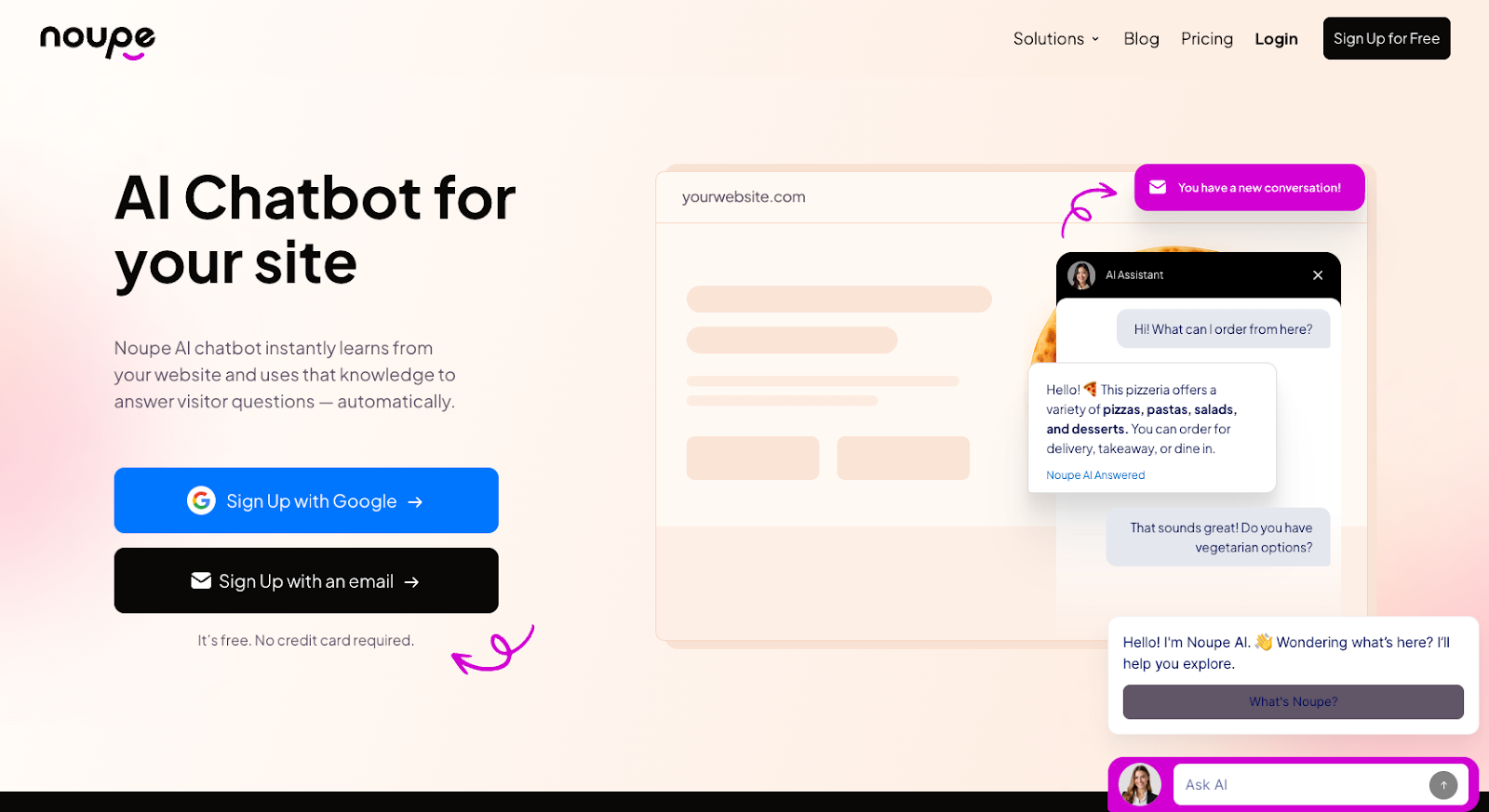
That’s a common problem. A service page explains the offer, the pricing page answers half the question, the FAQ covers the policy, and the visitor still opens chat with: “Do you handle this for my kind of business?” That’s exactly where a website-trained AI chatbot delivers so much value.
Noupe’s bots read public website pages and use that content to answer visitor questions. That means the bots start with material the business already trusts. You’re not rebuilding every answer from scratch or stuffing a generic chatbot with guesses.
It also lets teams add their own documents and Q&A sets, which is useful for the details that don’t belong on every public page: service rules, onboarding notes, product sheets, niche FAQs, or internal wording your team already uses.
The setup stays light. Add the embed code, adjust the look, set the first message, and shape the bot around the site. Size, color, avatar, alignment, and greeting all matter here. A bot that looks out of place feels suspicious before it says a word.
The multilingual feature is another practical win. Noupe detects the visitor’s language and answers in that language, which helps sites with search traffic from different countries, international buyers, or audiences a small team can’t support live.
Inbox delivery is one of those plain-looking features I’d check twice. When conversations reach the team in real time, you don’t just get follow-up chances. You get a running list of the places where your website failed to explain itself. If five visitors ask the same thing in a week, the page needs work.
Noupe isn’t trying to replace a call center platform, a WhatsApp workflow, or a giant support stack. Its lane is narrower: a website-first AI chatbot that learns from your content, answers with context, fits the site, and shows you what visitors were trying to find before they left.
Get AI chatbot features that deliver results
A long feature list can make a weak AI chatbot look more reassuring than it should. I’d take five chatbot features customers use every day over twenty-five dashboard extras nobody remembers are there.
The best AI chatbot features protect the visitor’s patience. They stop people from digging through pages, repeating themselves, waiting for office hours, or guessing whether the answer they got was real. They also protect your team from the classic chatbot mess: outdated answers, trapped conversations, mystery transcripts, and leads with no context.
This is why Noupe’s features, including website learning, custom knowledge, multilingual support, human follow-up, analytics, and brand controls, are so valuable. They may not be flashy, but they are the things that keep your chatbot useful after the launch excitement wears off.
If you’re ready to invest in chatbot features that actually pay off for your team, set up your free account with Noupe today.
FAQs
It can answer the questions people ask before they’re ready to deal with sales, marketing, or support. Questions like “Do you work with nonprofits?”, “Can I cancel monthly?”, “Is this available in Spanish?”, or “Where’s the setup guide?” If the answer already exists on your site, the bot should get people there without making them dig for it.
The useful benefit is less leakage. Fewer visitors leaving because a pricing page was vague. Fewer emails asking the same policy question. Fewer leads arriving with zero context. A good bot also exposes weak pages. If twenty people ask about the same missing detail, the bot didn’t create that problem. It found it.
Small teams should ignore the giant wishlist for a minute. Start with website learning, easy setup, custom Q&As, a branded widget, language support, and inbox delivery. That’s enough to answer common questions and catch decent leads without creating a whole new system to babysit.
No. They’re broad AI tools. Great for research, writing help, comparisons, and general questions. A website bot has a narrower job. It needs to know your offer, your pages, your policies, and what should happen next. Clever is nice. Correct is what keeps the sale alive.